
Introduction
Working with recorded audio and video has traditionally required technical skills, specialized software, and familiarity with timelines, waveforms, and production terminology. For many people producing podcasts, interviews, online lessons, or internal videos, these requirements can slow down workflows and increase reliance on specialists. At the same time, spoken content has become a central part of digital communication, education, and media publishing.
To address these challenges, a category of tools has emerged that focuses on simplifying editing by treating audio and video as text-first content. These tools aim to make editing more approachable by allowing users to work directly with written transcripts rather than complex visual timelines. The underlying idea is that if someone can edit a document, they can also edit spoken media.
This article provides an independent, educational examination of Descript, a software tool designed around this text-based approach. The discussion focuses on how the tool works, the types of users it serves, its potential advantages, and its limitations. The purpose is to inform readers, not to promote or recommend a purchase.
What Is Descript?
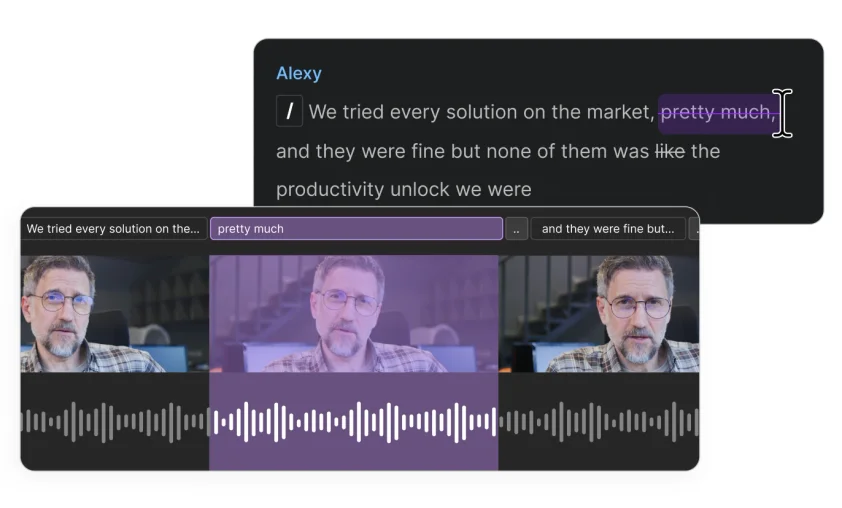
Descript is a digital software platform used for editing audio and video content through written transcripts. It belongs to the broader category of multimedia editing and transcription tools. Instead of requiring users to manually cut audio waveforms or video timelines, the software allows edits to be made by modifying text that represents spoken words.
When a recording is added to a project, Descript generates a transcript. Deleting or rearranging text in that transcript results in corresponding changes to the audio or video. This approach is particularly focused on spoken-word content rather than music-heavy or visually complex productions.
Such tools are commonly used by podcasters, educators, journalists, researchers, content creators, and teams that work with interviews, presentations, or instructional recordings. Descript is primarily designed for desktop use and combines several production-related functions into one workspace.
Key Features Explained
Text-Based Media Editing
The central feature of Descript is its text-driven editing model. Users interact with transcripts as editable documents. Removing sentences, correcting words, or rearranging paragraphs directly affects the underlying media. This reduces the need to search through long recordings manually.
Automated Speech Transcription
Descript includes automated speech-to-text functionality. Recordings are converted into text without the need for external transcription services. The quality of transcription depends on factors such as speaker clarity, background noise, and language variation.
Multitrack Project Support
Projects can include multiple speakers or media tracks. This is relevant for interviews, group discussions, or collaborative recordings where different voices need to be managed separately.
Built-In Recording Tools
The software allows users to record audio, video, or screen content directly within the platform. This supports workflows where recording and editing occur in the same environment, such as tutorials or remote interviews.
Caption and Subtitle Generation
Transcripts can be used to create captions or subtitles for video content. These can be edited for accuracy and clarity before being exported alongside the final media.
Collaborative Editing Environment
Descript supports collaboration by allowing multiple users to access and review projects. Team members can leave comments or make edits, which can be useful in editorial or educational settings.
Export and File Output Options
Completed projects can be exported in common audio and video formats. This allows content to be used across various publishing platforms or internal systems.
Common Use Cases
Podcast Editing and Production
Podcasters often work with long conversational recordings. Editing through text can make it easier to remove mistakes, repeated phrases, or irrelevant sections without scanning through waveforms.
Educational and Training Content
Teachers, trainers, and instructional designers may use Descript to record lectures, edit lessons, and produce transcripts that support learning and accessibility.
Interview-Based Media
Journalists, researchers, and content creators working with interviews can organize, edit, and archive spoken material more efficiently using transcript-based workflows.
Internal Communication and Documentation
Organizations sometimes record meetings, presentations, or training sessions. Descript can help convert these recordings into searchable and editable resources.
Accessibility-Oriented Publishing
By generating transcripts and captions, the software can support accessibility needs and make content usable for audiences who prefer or require text-based formats.
Potential Advantages
Potential Workflow Efficiency
Editing through text may reduce the time spent locating specific sections in long recordings, especially when dealing with interviews or lectures.
Potential Accessibility Improvements
Built-in transcription and captioning features can make content more accessible to a wider audience, including those with hearing impairments.
Potential Reduction in Technical Complexity
Users without formal training in audio or video production may find text-based editing easier to understand than traditional timeline-based tools.
Potential Collaboration Benefits
Shared projects and commenting features can simplify review processes and reduce the need for file transfers between collaborators.
Potential Centralization of Tasks
Recording, transcription, editing, and exporting within a single platform can reduce the need to switch between multiple tools.
Limitations & Considerations
Transcription Accuracy Constraints
Automated transcription is not error-free. Accents, overlapping speech, technical terminology, and poor audio quality can lead to inaccuracies that require manual correction.
Learning Curve for New Users
While simpler in some respects, the text-based editing model may still require time to understand, especially for users accustomed to traditional editing software.
System Performance Requirements
Large projects with multiple tracks or long recordings can place demands on system resources. Performance may vary depending on hardware capabilities.
Limited Advanced Editing Features
Descript is primarily focused on spoken content. Users who require advanced audio mixing, detailed sound design, or complex visual effects may find the feature set insufficient.
Dependence on Recording Quality
The effectiveness of transcription-based editing depends heavily on clear audio input. Background noise or inconsistent microphone quality can reduce usability.
Not Optimized for Music Production
Projects centered on music composition or detailed audio mastering may be better served by specialized digital audio workstations.
Who Should Consider Descript
- Podcasters and spoken-word content creators
- Educators producing lectures or instructional videos
- Journalists and researchers handling recorded interviews
- Small teams collaborating on audio or video projects
- Users who prefer document-style workflows
Who May Want to Avoid It
- Professional video editors requiring advanced visual effects
- Audio engineers focused on detailed mixing and mastering
- Music producers working primarily with instrumental tracks
- Users who need frame-level control or cinematic editing features
Comparison With Similar Descript
Within the broader landscape of media software, Descript occupies a middle ground between transcription services and traditional editing tools. Some platforms focus mainly on converting speech to text, offering limited editing capabilities. Others provide deep control over timelines, audio levels, and visual elements but require greater technical expertise. Descript combines transcription with basic editing in a single environment, prioritizing spoken-word workflows. The most appropriate choice depends on project complexity, user experience, and content type.
Final Educational Summary
Descript reflects a broader shift toward making audio and video editing more accessible through text-based interaction. By allowing users to edit recordings as if they were documents, it can simplify common tasks related to spoken content. This approach may be particularly useful for podcasts, interviews, and educational materials.
At the same time, the software has clear boundaries. Its reliance on transcription accuracy, focus on speech, and limited advanced editing features mean it is not suitable for all production needs. Users should carefully assess their technical requirements, content goals, and workflow preferences before relying on any single tool.
Independent research and hands-on evaluation remain important steps in selecting digital software for audio and video work.
Disclosure: This article is for educational and informational purposes only. Some links on this website may be affiliate links, but this does not influence our editorial content or evaluations.
