
Introduction
Modern professionals often manage multiple communication channels such as email, calendars, team messaging platforms, and task systems. Important updates, deadlines, and follow-ups may be scattered across these tools, creating a fragmented workflow. As a result, individuals can spend significant time reviewing notifications and messages before identifying what actually requires attention.
This type of information overload can reduce focus and slow decision-making. Tools designed to summarize and prioritize information attempt to address this issue by consolidating signals from different sources into a single structured overview. One example of such a system is TheTop.
What Is TheTop?
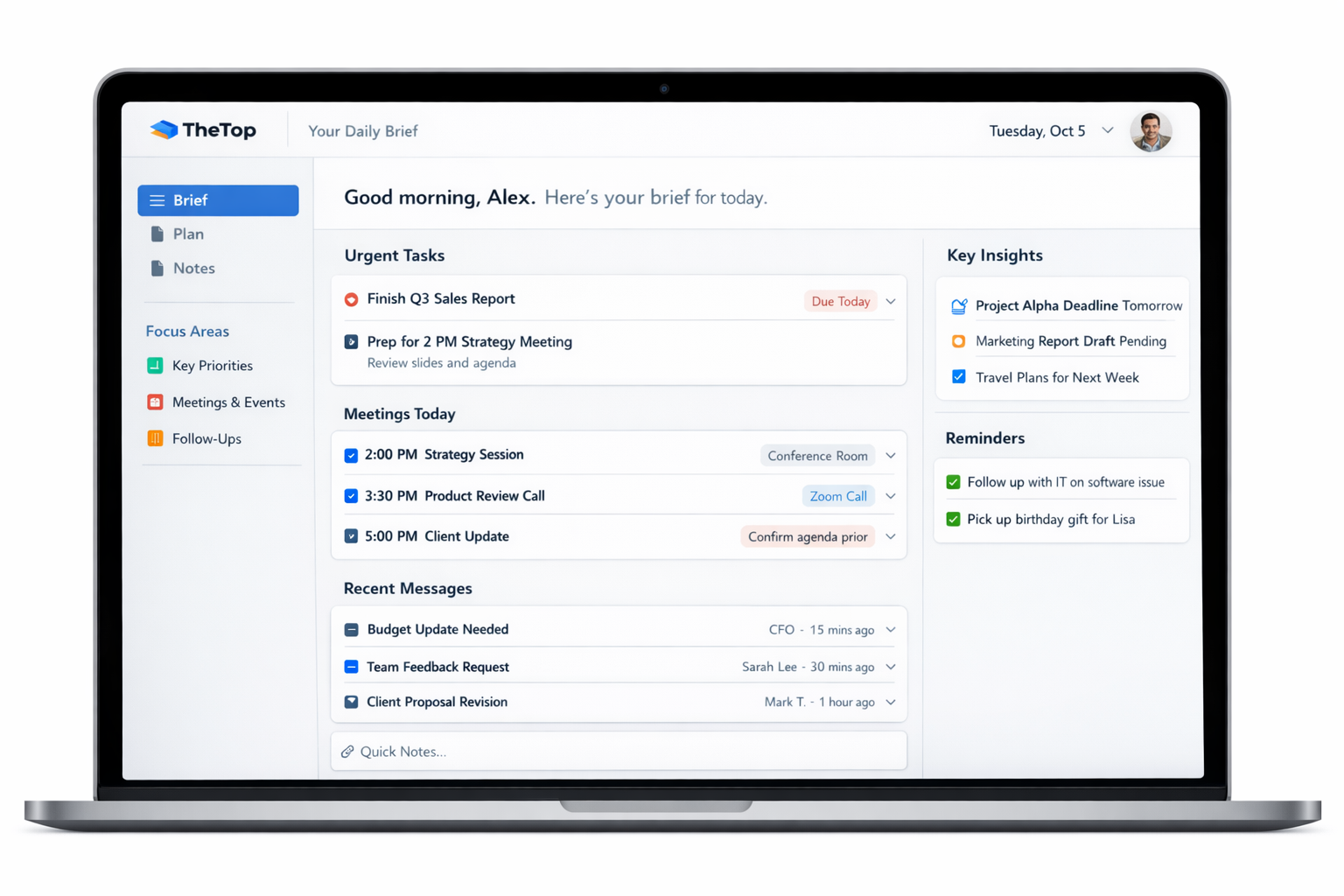
TheTop is a digital productivity platform designed to generate a daily briefing based on information collected from connected tools such as email, calendars, and messaging platforms. The system organizes these inputs into a prioritized summary intended to highlight tasks, deadlines, and follow-ups for the day.
The platform positions itself as a “personal chief of staff,” meaning it attempts to analyze incoming signals and identify what requires attention first. Instead of navigating multiple applications individually, users receive a condensed overview of their priorities in one place.
The tool is typically used by professionals who want a simplified daily plan created automatically from their existing workflow tools.
Key Features Explained
Daily Priority Brief
The platform generates a daily summary that organizes tasks, updates, and deadlines according to importance and urgency. This brief is designed to help users quickly identify what requires attention first each day.
Tool Integrations
The system can connect with common workplace tools such as Gmail, Google Calendar, and Slack. These integrations allow the platform to gather signals from multiple sources and consolidate them into a single view.
Priority Management
Users can adjust the order of tasks, mark items as important, or add new priorities manually. The system adapts the daily overview based on these changes.
Clarity Dashboard
The platform provides a dashboard view where tasks, potential risks, and upcoming items can be reviewed in one interface, reducing the need to switch between different applications.
Contextual Insights
Some versions of the platform attempt to identify patterns across emails, meetings, and deadlines, providing additional context about what may require follow-up.
Common Use Cases
Daily Planning for Professionals
Individuals managing multiple responsibilities may use the system to obtain a quick overview of important tasks and commitments each morning.
Small Business Operations
Owners or managers handling emails, vendor communication, and scheduling can use the daily brief to track priorities without reviewing each channel separately.
Task and Communication Consolidation
Teams that rely on several digital tools can use the platform to bring updates into a single prioritized summary.
Personal Productivity Management
Some users connect personal reminders and calendar events alongside work-related information to create a unified daily overview.
Potential Advantages
Reduced Information Overload
By consolidating signals from different sources, the platform may reduce the time required to review multiple tools individually.
Centralized Overview
A single daily brief can provide a simplified snapshot of priorities and deadlines.
Flexible Priority Adjustment
Users can modify priorities or add tasks to refine the daily overview.
Integration With Existing Tools
Rather than replacing productivity systems, the platform works alongside existing communication and scheduling tools.
Limitations & Considerations
Dependence on Integrations
The accuracy of the daily brief depends on which tools are connected and how well they synchronize.
Learning Curve for Personalization
Users may need time to configure integrations and refine priorities so the system reflects their workflow correctly.
Limited Free Access
Some productivity tools with similar functionality offer free tiers, while others may require a subscription or trial period.
Automation Accuracy
Automated summaries may occasionally misinterpret priority levels if contextual information is incomplete.
Who Should Consider TheTop
- Professionals managing multiple communication tools
- Founders or managers tracking emails, meetings, and deadlines
- Individuals seeking a structured daily overview of tasks
- Users interested in automated productivity summaries
Who May Want to Avoid
- Individuals who prefer fully manual task management systems
- Users who do not rely heavily on integrated digital tools
- Teams already using advanced project management platforms that provide similar summaries
Comparison With Similar Tools
Several productivity platforms address similar challenges but use different approaches.
Task Management Tools
Platforms such as task boards or project management software typically require manual task entry and organization.
Calendar-Centric Tools
Some productivity apps focus primarily on scheduling and time blocking rather than summarizing communication signals.
AI Productivity Assistants
A newer category of tools attempts to analyze emails, meetings, and messages to automatically generate summaries and recommended priorities.
TheTop fits primarily into the third category by focusing on automated daily briefings rather than manual task planning.
Final Educational Summary
TheTop is a productivity platform designed to summarize information from multiple digital tools and convert it into a structured daily brief. By connecting services such as email and calendars, it attempts to identify important tasks, deadlines, and follow-ups in a single dashboard.
The platform illustrates a broader trend toward AI-assisted workflow organization, where systems attempt to reduce information overload by prioritizing signals from multiple sources. As with many productivity tools, the usefulness of such systems often depends on integration quality, user workflow, and personal preferences for task management.
Disclosure
This article is provided for informational and educational purposes only. It does not promote, endorse, or guarantee any software product or service. Features, availability, and pricing may change over time, and readers should review official documentation or product sources before making decisions related to digital tools.
