
Introduction
Small and medium-sized trade businesses often encounter operational inefficiencies that stem from fragmented workflows. Scheduling jobs, tracking invoices, managing customer relationships, and monitoring team performance are frequently handled across disconnected tools or manual processes. This fragmentation can result in missed appointments, delayed payments, and limited visibility into business operations.
To address these challenges, a category of software known as field service management (FSM) tools has emerged. These platforms are designed to centralize operational tasks for service-based industries such as electrical work, plumbing, HVAC, and property maintenance. By consolidating administrative and field activities into a unified system, FSM tools aim to reduce manual workload and improve coordination between office staff and field technicians.
Within this category, Tradify is one such platform developed specifically for trade professionals. It offers a range of features intended to streamline job management, invoicing, and communication processes.
What Is Tradify?
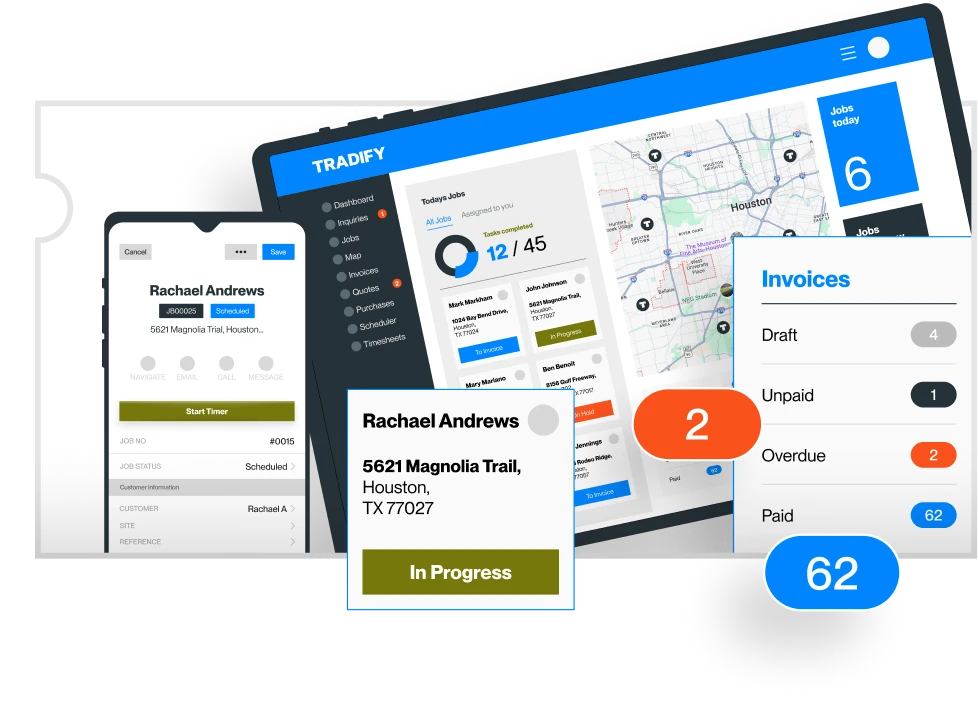
Tradify is a cloud-based field service management software designed primarily for tradespeople and small service businesses. It functions as a centralized platform where users can manage day-to-day operations, including job scheduling, quoting, invoicing, and customer data.
The platform is accessible via web browsers and mobile applications, enabling both office administrators and field workers to interact with the system in real time. Tradify is commonly categorized under:
- Field service management software
- Job management systems
- Trade business management tools
Its core purpose is to reduce administrative complexity while maintaining visibility across ongoing projects and financial transactions.
Key Features Explained
Job Scheduling and Management
One of the foundational components of Tradify is its job scheduling system. Users can create, assign, and track jobs through a centralized dashboard. Each job entry can include details such as location, required materials, assigned staff, and timelines.
The scheduling interface typically provides a calendar view, allowing businesses to allocate resources efficiently and avoid overlapping assignments. Field technicians can access job details through mobile devices, which helps maintain consistency between planning and execution.
Quoting and Estimation Tools
Tradify includes tools for generating job quotes and cost estimates. Users can create detailed estimates based on labor, materials, and additional expenses. These quotes can then be converted into active jobs once approved.
This feature supports structured pricing and helps maintain documentation for financial tracking. It also reduces the need for separate spreadsheet-based estimation methods.
Invoicing and Payment Tracking
The platform integrates invoicing functionality, allowing users to generate invoices directly from completed jobs. This eliminates the need to re-enter data manually.
Invoices can include itemized costs and payment terms. Tradify also supports tracking of outstanding payments, enabling businesses to monitor cash flow more effectively.
Customer Relationship Management (CRM)
Tradify includes basic CRM capabilities, storing customer information such as contact details, job history, and communication records. This centralized database helps businesses maintain continuity in customer interactions.
Having access to historical data can be particularly useful for repeat clients or ongoing service contracts.
Mobile Accessibility
A mobile application is available for field technicians, enabling them to:
- View assigned jobs
- Update job status
- Capture notes and images
- Generate invoices on-site
This reduces reliance on paper-based workflows and improves real-time communication between teams.
Reporting and Business Insights
Tradify provides reporting tools that allow users to analyze business performance. Reports may include:
- Revenue summaries
- Outstanding invoices
- Job completion rates
- Staff productivity
These insights can help businesses identify trends and make operational adjustments.
Common Use Cases
Small Trade Businesses
Tradify is frequently used by small businesses in trades such as plumbing, electrical work, and HVAC services. These businesses often require a simple yet structured system to manage daily operations without investing in complex enterprise software.
Independent Contractors
Solo contractors may use Tradify to organize job schedules, track expenses, and maintain client records. The platform can serve as an all-in-one administrative tool.
Growing Service Companies
As service businesses expand, managing multiple employees and job sites becomes more complex. Tradify can assist in coordinating team activities and maintaining oversight across multiple projects.
Maintenance and Repair Services
Businesses offering recurring maintenance services can use Tradify to schedule repeat jobs and maintain service histories for each client.
Potential Advantages
Centralized Workflow Management
Tradify consolidates multiple operational functions into a single platform. This reduces the need to switch between different tools for scheduling, invoicing, and customer management.
Improved Coordination Between Teams
With mobile access and real-time updates, both office staff and field workers can stay aligned. This reduces communication gaps and minimizes scheduling conflicts.
Reduced Administrative Burden
Automating tasks such as invoicing and job tracking can decrease the amount of manual data entry required. This can free up time for core business activities.
Enhanced Record Keeping
The platform maintains digital records of jobs, invoices, and customer interactions. This can be useful for audits, financial tracking, and customer service.
Scalability for Small Businesses
Tradify is designed with small and medium-sized businesses in mind, making it adaptable as operations grow.
Limitations & Considerations
Learning Curve for New Users
Although designed to be user-friendly, adopting any new software requires time for onboarding. Users unfamiliar with digital tools may need additional training.
Feature Depth Compared to Enterprise Systems
Tradify focuses on simplicity and usability, which may limit the depth of advanced features found in larger enterprise-level FSM platforms.
Dependence on Internet Connectivity
As a cloud-based system, Tradify requires reliable internet access. Limited connectivity in remote job locations could affect real-time updates.
Customization Constraints
Some businesses may find limitations in customizing workflows or reports to match highly specific operational needs.
Subscription-Based Pricing Model
Like many SaaS platforms, Tradify operates on a subscription basis. Ongoing costs may be a consideration for smaller businesses with tight budgets.
Who Should Consider Tradify
Tradespeople Seeking Digital Organization
Individuals or businesses transitioning from paper-based systems to digital workflows may find Tradify suitable for managing operations more efficiently.
Small to Mid-Sized Service Businesses
Companies that require a structured system for scheduling, invoicing, and customer management without extensive complexity may benefit from this platform.
Teams with Mobile Workforces
Businesses with field technicians who need access to job information on the go may find the mobile capabilities useful.
Businesses Experiencing Growth
Organizations expanding their operations may use Tradify to maintain control over increasing job volumes and team coordination.
Who May Want to Avoid It
Large Enterprises with Complex Requirements
Organizations requiring highly customizable workflows, advanced analytics, or deep integrations with enterprise systems may find Tradify insufficient.
Businesses Operating in Low-Connectivity Areas
If consistent internet access is not available, relying on a cloud-based system could present challenges.
Users Seeking Extensive Automation
Some platforms offer more advanced automation capabilities, which may be necessary for businesses with highly complex processes.
Companies Already Using Integrated Systems
Businesses with established ERP or CRM systems may find it redundant to adopt an additional standalone tool.
Comparison With Similar Tools
Tradify vs Jobber
Jobber is another field service management platform that offers similar features such as scheduling, invoicing, and CRM. However, Jobber tends to emphasize client communication tools and integrations, whereas Tradify focuses on streamlined job tracking and simplicity.
Tradify vs ServiceM8
ServiceM8 provides detailed job tracking and workflow automation, particularly for small service businesses. Compared to Tradify, it may offer more customization in job processes but can also be more complex to configure.
Tradify vs Housecall Pro
Housecall Pro includes marketing and customer engagement features alongside core FSM capabilities. Tradify, in contrast, maintains a more operational focus, emphasizing job management and invoicing.
Tradify vs Tradify Alternatives in Emerging Markets
In regions such as India and Southeast Asia, locally developed FSM tools may offer pricing or feature sets tailored to regional needs. Tradify competes in this space by offering a globally standardized solution.
Final Educational Summary
Tradify represents a category of software designed to address operational inefficiencies in trade and service businesses. By integrating job management, invoicing, scheduling, and customer data into a single platform, it aims to simplify workflows and improve coordination between office and field teams.
Its design prioritizes usability and accessibility, making it particularly relevant for small and medium-sized businesses seeking to transition to digital systems. While it may not provide the advanced capabilities of enterprise-level platforms, it offers a balanced set of features suitable for many service-based operations.
As with any software, its effectiveness depends on the specific needs, scale, and operational context of the business using it. Evaluating factors such as feature requirements, budget, and technical readiness is essential before adopting any field service management solution.
Disclosure: This article is for educational and informational purposes only. Some links on this website may be affiliate links, but this does not influence our editorial content or evaluations.
