
Introduction
Modern website development involves multiple layers of collaboration, including designers, developers, project managers, and clients. One recurring challenge in this process is the communication of feedback. Traditional methods—such as email threads, spreadsheets, or messaging platforms—often lead to fragmented discussions, unclear instructions, and delayed revisions. Misinterpretation of feedback can further complicate workflows, particularly when comments lack context about specific design elements or technical components.
To address these inefficiencies, a category of tools known as website feedback and bug tracking platforms has emerged. These tools aim to centralize feedback directly within the visual context of a webpage, allowing teams to communicate more precisely. Within this category, BugHerd represents a widely recognized example designed to simplify issue reporting and collaborative review processes.
What Is BugHerd?
BugHerd is a cloud-based website feedback and bug tracking tool that enables users to leave comments directly on live or staged websites. Unlike traditional issue trackers that require manual descriptions, BugHerd captures feedback visually by allowing users to click on elements of a webpage and attach comments to specific locations.
Functionally, BugHerd operates as a hybrid between a visual feedback system and a lightweight project management tool. It automatically logs technical details—such as browser type, screen resolution, and operating system—alongside each reported issue. This contextual data assists development teams in diagnosing and resolving problems more efficiently.
BugHerd is typically classified under:
- Website feedback tools
- Bug tracking systems
- Visual collaboration platforms
Its primary purpose is to reduce ambiguity in communication during website development and maintenance.
Key Features Explained
Visual Feedback Layer
One of the defining characteristics of BugHerd is its overlay system. Users can activate a feedback mode and click anywhere on a webpage to leave comments. Each comment is pinned to a specific element, creating a visual reference point.
This approach minimizes the need for descriptive explanations such as “the button on the top right,” replacing them with precise, location-based annotations.
Automatic Technical Metadata Capture
BugHerd automatically records technical information when a comment is submitted. This includes:
- Browser version
- Operating system
- Screen resolution
- URL of the page
This data reduces the back-and-forth typically required to reproduce bugs, particularly in cross-browser testing scenarios.
Task Board Integration
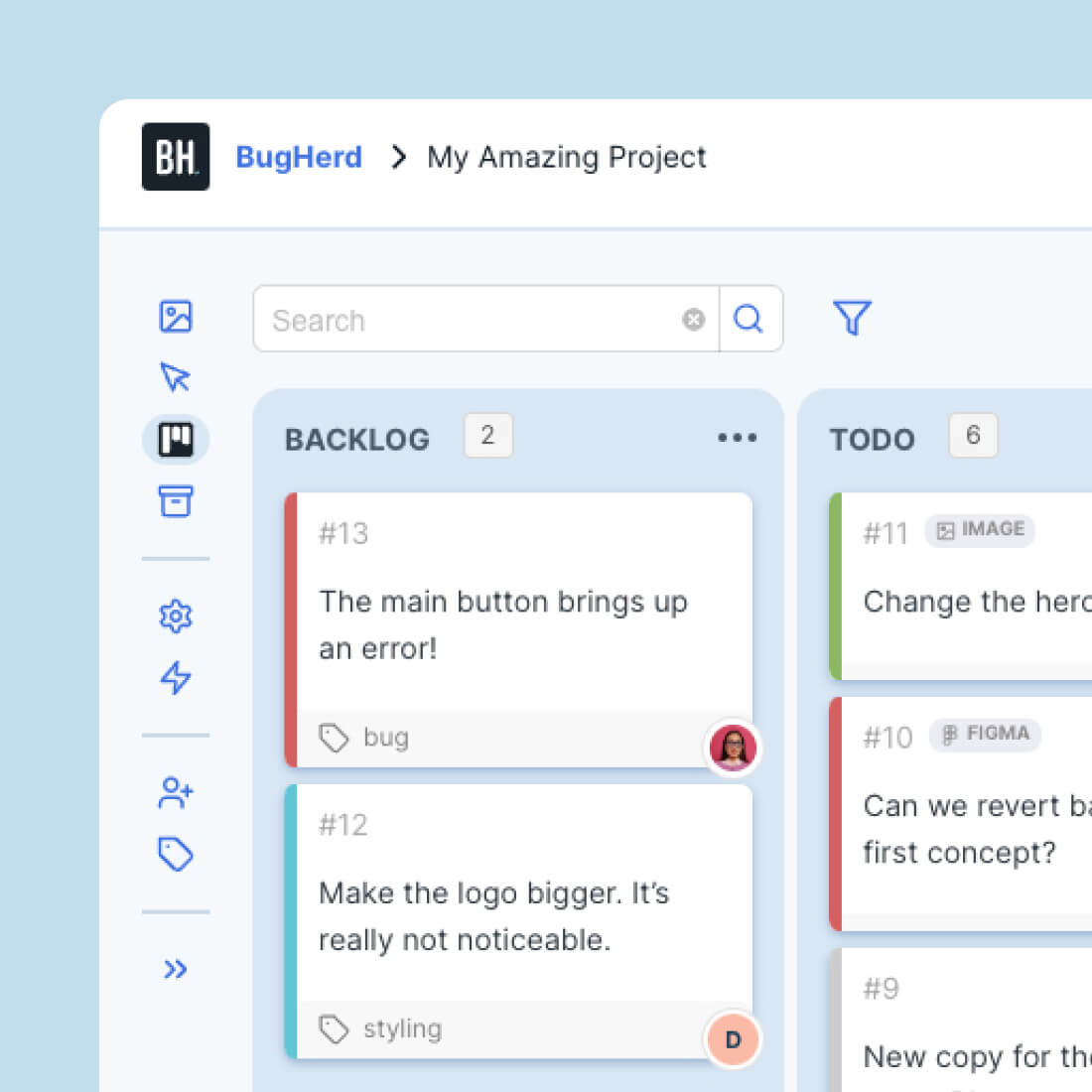
Feedback submitted through BugHerd is converted into tasks on a Kanban-style board. These tasks can be categorized, prioritized, and assigned to team members.
The task board provides a centralized view of all reported issues, enabling teams to track progress without switching to a separate project management system.
Client-Friendly Access
BugHerd allows external stakeholders, such as clients, to provide feedback without requiring technical knowledge. A simplified interface ensures that non-technical users can participate in the review process without navigating complex tools.
This feature is particularly relevant for agencies managing client projects.
Screenshot and Annotation Support
Each comment is accompanied by a screenshot, capturing the exact state of the webpage at the time of feedback. Users can also annotate screenshots to highlight specific areas of concern.
This adds an additional layer of clarity, especially when dynamic elements are involved.
Integration With Development Tools
BugHerd can integrate with commonly used project management and issue tracking platforms. This enables teams to sync tasks with broader workflows, ensuring that feedback does not remain isolated.
Common Use Cases
Website Development Projects
During the development phase, BugHerd is often used to collect feedback from designers and stakeholders. Instead of compiling feedback in documents, reviewers can comment directly on the site.
This reduces ambiguity and accelerates iteration cycles.
Quality Assurance and Testing
Quality assurance teams can use BugHerd to log bugs during testing. The automatic capture of technical details simplifies the process of reproducing and resolving issues.
Client Review and Approval
Agencies frequently use BugHerd to streamline client feedback. Clients can review staging sites and leave comments without needing to understand development terminology.
This improves communication between technical and non-technical participants.
Ongoing Website Maintenance
For live websites, BugHerd can serve as a tool for reporting issues or suggesting updates. Teams can track these requests and prioritize them within a structured workflow.
Remote Team Collaboration
Distributed teams often face communication challenges due to time zone differences. BugHerd provides a shared workspace where feedback is documented and accessible at any time.
Potential Advantages
Reduced Communication Friction
By embedding feedback directly into the website interface, BugHerd eliminates the need for lengthy explanations. This can lead to clearer communication and fewer misunderstandings.
Context-Rich Issue Reporting
The combination of visual annotations, screenshots, and technical metadata provides comprehensive context for each issue. This reduces the time required for clarification.
Improved Workflow Organization
The built-in task board allows teams to manage feedback alongside development tasks. This integration can streamline project workflows.
Accessibility for Non-Technical Users
BugHerd’s interface is designed to be intuitive, enabling clients and stakeholders to participate without technical training.
Faster Feedback Cycles
Because feedback is centralized and structured, teams can respond more quickly. This can shorten development timelines in some cases.
Limitations & Considerations
Dependency on Browser Extensions
BugHerd often relies on browser-based functionality, which may require installation or configuration. This can be a minor barrier for some users.
Limited Scope Beyond Web Projects
The tool is specifically designed for websites. It may not be suitable for broader software development projects, such as mobile applications or backend systems.
Potential Learning Curve for Workflow Integration
While the interface is relatively straightforward, integrating BugHerd into existing workflows may require adjustments, particularly for teams already using established project management systems.
Cost Considerations
As a subscription-based service, BugHerd introduces an additional expense. Organizations must evaluate whether its benefits justify the cost within their workflow.
Overlap With Existing Tools
Teams already using comprehensive project management platforms may find some feature overlap, particularly in task tracking and issue management.
Who Should Consider Bugherd
Web Design and Development Agencies
Agencies managing multiple client projects may find BugHerd useful for consolidating feedback and simplifying communication.
Freelance Developers
Independent developers working with clients can use BugHerd to collect structured feedback without relying on scattered communication channels.
UX/UI Designers
Designers can benefit from visual feedback tied directly to interface elements, enabling more precise revisions.
Quality Assurance Teams
QA professionals can use BugHerd to document bugs with detailed context, improving the efficiency of testing processes.
Small to Medium-Sized Teams
Teams without complex project management infrastructure may find BugHerd sufficient for both feedback collection and task tracking.
Who May Want to Avoid It
Large Enterprises With Established Systems
Organizations already using advanced issue tracking systems may not require an additional tool for visual feedback.
Non-Web Development Teams
Teams working primarily on mobile apps, desktop software, or backend systems may find BugHerd less relevant.
Highly Technical Development Environments
Projects requiring detailed technical issue tracking, such as those involving complex software architectures, may benefit more from specialized tools.
Budget-Constrained Projects
Smaller projects with limited budgets may opt for simpler or free alternatives, even if they lack some of BugHerd’s features.
Comparison With Similar Tools
BugHerd operates within a competitive landscape of website feedback and bug tracking tools. Comparing it with alternatives helps clarify its positioning.
BugHerd vs Visual Feedback Tools
Other visual feedback platforms offer similar functionality, such as on-page commenting and screenshot capture. BugHerd distinguishes itself through its integrated task board and automatic metadata capture.
BugHerd vs Traditional Bug Tracking Systems
Traditional systems often require manual input and lack visual context. BugHerd simplifies issue reporting but may not provide the depth of features found in more complex systems.
BugHerd vs Project Management Platforms
General project management tools can track tasks but typically lack visual feedback capabilities. BugHerd bridges this gap by combining feedback collection with task management.
BugHerd vs Collaboration Tools
Messaging platforms facilitate communication but do not structure feedback in a way that is actionable for development teams. BugHerd provides a more organized approach.
Final Educational Summary
BugHerd represents a specific approach to addressing a common problem in web development: the disconnect between feedback and implementation. By embedding comments directly within the visual context of a webpage, it reduces ambiguity and improves communication among team members.
Its combination of visual feedback, automatic metadata capture, and task management features positions it as a practical solution for website-focused workflows. However, its effectiveness depends on the context in which it is used. Teams with existing systems or broader development needs may find it less applicable.
Understanding tools like BugHerd requires considering both their capabilities and their limitations. While they can streamline certain aspects of collaboration, they are not universal solutions. Evaluating workflow requirements, team structure, and project scope is essential when determining their relevance.
Disclosure: This article is for educational and informational purposes only. Some links on this website may be affiliate links, but this does not influence our editorial content or evaluations.
