
Introduction
Modern digital communication often depends on directing users to focused web pages designed around a single objective, such as sharing information, collecting sign-ups, or presenting a specific message. These pages are commonly referred to as landing pages. Unlike general websites, landing pages usually remove distractions and concentrate on one clear purpose.
As online advertising, email campaigns, and social media promotions have expanded, the need for tools that simplify the creation and management of landing pages has also grown. Many organizations do not have the technical resources to design, code, test, and maintain multiple pages manually. This gap has led to the development of specialized landing page platforms.
This article provides an educational and neutral overview of Instapage, a software platform designed for creating and managing landing pages. The discussion focuses on how the tool works, its main features, common use cases, potential advantages, and limitations. Readers are encouraged to evaluate the information based on their own requirements.
What Is Instapage?
Instapage is a web-based software platform that falls into the category of landing page builders and optimization tools. Its primary function is to allow users to design, publish, and manage standalone web pages without requiring advanced coding skills.
Tools in this category are typically used by marketing teams, product teams, and organizations that run digital campaigns. Instapage is often associated with environments where traffic is driven from paid advertising, email campaigns, or targeted promotions, and where performance measurement is important.
Unlike general website builders, landing page platforms focus on individual pages rather than full multi-page sites. Instapage is structured around this model, offering design, testing, and analytics features centered on individual landing pages.
Key Features Explained
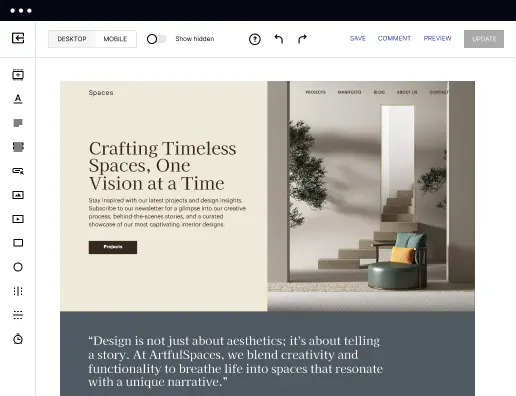
1. Drag-and-Drop Page Editor
Instapage includes a visual editor that allows users to place and adjust page elements such as text, images, forms, and buttons. Elements can be positioned freely rather than being restricted to fixed grid layouts. This approach is intended to give designers more flexibility in page layout.
2. Pre-Built Page Templates
The platform provides a library of templates designed for common landing page scenarios. These templates act as starting points and can be modified within the editor. Templates are categorized by general use cases such as lead capture or event promotion.
3. Reusable Page Blocks
Instapage allows users to save sections of a page, often referred to as blocks, and reuse them across multiple pages. This feature is designed to support consistency and reduce repetitive design work.
4. Publishing Options
Pages created in Instapage can be published in several ways, such as on custom domains or connected subdomains. This flexibility supports different hosting and branding requirements without requiring users to manage their own servers.
5. Basic Analytics and Page Performance Data
The platform includes built-in analytics that display visitor behavior and conversion-related data at the page level. These metrics are intended to help users understand how visitors interact with individual pages.
6. A/B Testing Tools
Instapage supports the creation of multiple page variants for testing purposes. Users can compare versions of a page to observe differences in user behavior. This feature is commonly used to test design or content changes.
7. Collaboration Features
The platform includes tools that allow multiple team members to work on pages, leave comments, and review changes. These features are typically used in team-based workflows.
Common Use Cases
Instapage is used in a variety of professional contexts where focused web pages are required. Common scenarios include:
- Advertising Campaign Landing Pages
Organizations running paid advertising campaigns often use landing pages to align messaging with specific ads. - Lead Collection Pages
Forms embedded in landing pages are frequently used to collect contact information for newsletters, webinars, or gated content. - Product or Feature Announcements
Teams may use standalone pages to present information about a new product feature or update without modifying a full website. - Event Registration Pages
Landing pages are often used to share event details and collect registrations in a single location. - Campaign Testing and Optimization
Marketing teams may use the platform to test different layouts or messaging approaches and analyze results.
Potential Advantages
1. Reduced Dependence on Developers
Non-technical users can create and modify pages without writing code, which may reduce internal development workload.
2. Focused Page Design
The platform is designed specifically for single-purpose pages, which can help maintain clarity and consistency.
3. Integrated Testing Tools
Built-in testing features allow experimentation without relying on external tools.
4. Centralized Page Management
Multiple pages can be managed from a single interface, which may simplify oversight for larger teams.
5. Collaboration Support
Commenting and review features can support structured feedback during page development.
Limitations & Considerations
This section is critical for balanced evaluation.
1. Narrow Scope Compared to Full Website Builders
Instapage is not designed to replace full website platforms. Organizations needing blogs, complex navigation, or multi-page sites may require additional tools.
2. Learning Curve for Advanced Features
While basic page creation is accessible, advanced testing, analytics interpretation, and collaboration features may require time to learn.
3. Cost Considerations for Smaller Teams
Landing page platforms in this category are often priced for professional use. Smaller organizations or individuals may find the cost difficult to justify depending on usage.
4. Design Freedom Can Increase Complexity
The lack of rigid layout constraints offers flexibility but may also result in inconsistent designs if not managed carefully.
5. Performance Data Requires Interpretation
Analytics and test results provide data, but meaningful conclusions depend on user expertise and context.
Who Should Consider Instapage
- Marketing or growth teams managing multiple digital campaigns
- Organizations running paid advertising that requires dedicated landing pages
- Teams that value collaboration and version testing
- Businesses that already have a main website but need campaign-specific pages
Who May Want to Avoid It
- Individuals seeking an all-in-one website builder
- Projects with very limited budgets
- Users who only need occasional, simple pages
- Teams without the time or resources to analyze performance data
Comparison With Similar Tools Instapage
Instapage exists alongside other landing page and website-building platforms. Some alternatives focus more on complete website creation, while others emphasize simplicity over testing and analytics. Compared to general website builders, Instapage is more specialized but narrower in scope. Compared to simpler landing page tools, it often offers deeper testing and collaboration features but may require greater investment and learning effort. No single tool is universally suitable, and comparisons depend heavily on project needs.
Final Educational Summary
Instapage is a specialized landing page platform designed to support the creation, testing, and management of focused web pages. Its features are structured around professional workflows that involve experimentation, collaboration, and performance analysis. While it offers flexibility and depth for teams managing campaigns at scale, it is not intended to replace full website platforms and may not suit every budget or use case.
This article is intended to provide an objective overview rather than guidance on purchasing decisions. Readers should evaluate tools based on their own technical requirements, team size, and project goals, and should consider comparing multiple platforms before making any decisions.
Disclosure: This article is for educational and informational purposes only. Some links on this website may be affiliate links, but this does not influence our editorial content or evaluations.