
Introduction
Managing construction projects has historically involved fragmented workflows, manual documentation, and coordination challenges across multiple stakeholders. Contractors, project managers, subcontractors, and clients often rely on separate systems or informal processes to track budgets, timelines, and communication. This fragmentation increases the likelihood of delays, cost overruns, and administrative inefficiencies.
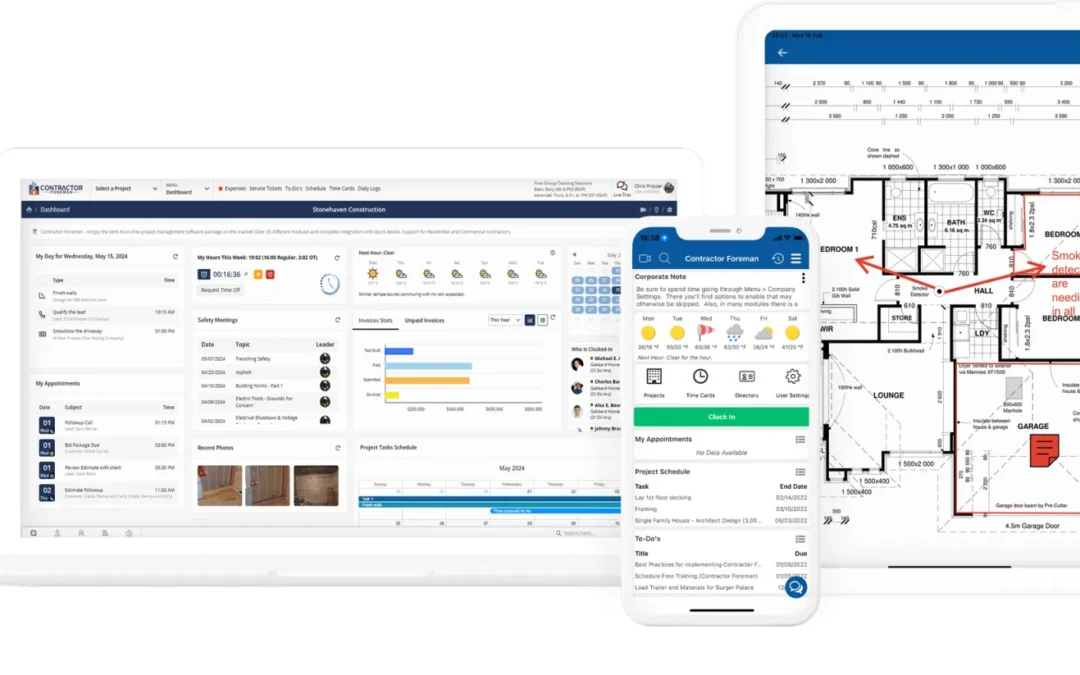
To address these challenges, construction management software has emerged as a specialized category within project management technology. These platforms are designed to centralize operations, improve transparency, and standardize workflows across construction projects. Among the tools developed for this purpose is Contractor Foreman, a platform aimed at streamlining project coordination and administrative tasks within the construction sector.
Learn More About Contractor Foreman
What Is Contractor Foreman?
Contractor Foreman is a cloud-based construction management software platform designed to assist contractors and construction teams in organizing, tracking, and managing project-related activities. It falls within the broader category of construction project management tools, with a focus on affordability and accessibility for small to mid-sized businesses.
The platform integrates multiple operational functions into a single system, including scheduling, estimating, document management, and communication tracking. By consolidating these elements, Contractor Foreman seeks to reduce reliance on disconnected tools such as spreadsheets, email threads, and paper-based documentation.
Unlike general-purpose project management applications, Contractor Foreman is specifically tailored to construction workflows. Its feature set reflects the operational realities of construction projects, including job costing, subcontractor coordination, and compliance documentation.
Key Features Explained
Project Scheduling and Planning
One of the core capabilities of Contractor Foreman is its scheduling functionality. Users can create project timelines, assign tasks, and monitor progress through calendar-based or Gantt-style views. These tools help teams visualize dependencies and track milestones across different phases of construction.
Scheduling tools also allow for adjustments when delays occur, which is a common scenario in construction environments. Changes can be reflected across the project timeline, providing updated visibility for stakeholders.
Estimating and Cost Tracking
Accurate cost estimation is critical in construction. Contractor Foreman includes tools for generating project estimates, tracking expenses, and comparing projected versus actual costs. These features are intended to support financial oversight and reduce discrepancies between bids and final expenditures.
Users can input material costs, labor rates, and other variables to build detailed estimates. Over time, this data can also contribute to more informed decision-making in future projects.
Document and File Management
Construction projects involve a large volume of documents, including contracts, permits, blueprints, and inspection reports. Contractor Foreman provides centralized storage for these files, enabling users to upload, organize, and retrieve documents as needed.
Version control features help ensure that team members are working with the most current information. This can be particularly relevant in projects where design revisions or regulatory updates occur.
Communication and Collaboration Tools
Effective communication is essential for coordinating multiple teams and stakeholders. Contractor Foreman includes messaging and notification features that allow users to share updates, assign tasks, and track conversations within the platform.
By keeping communication tied to specific projects or tasks, the platform reduces reliance on external channels such as email or messaging apps, which can become disorganized over time.
Time Tracking and Workforce Management
The platform offers time tracking tools that allow employees and subcontractors to log hours directly within the system. This information can be used for payroll processing, labor cost analysis, and productivity tracking.
Workforce management features also include task assignments and performance tracking, helping supervisors monitor progress and allocate resources effectively.
Reporting and Analytics
Contractor Foreman provides reporting tools that generate insights into various aspects of project performance. Users can create reports related to budgets, timelines, workforce activity, and other metrics.
These reports can support internal evaluations and provide documentation for clients or regulatory requirements.
Common Use Cases
Small Construction Firms
Smaller construction companies often operate with limited administrative resources. Contractor Foreman can serve as a centralized system for managing projects without requiring multiple software subscriptions.
General Contractors
General contractors overseeing multiple projects simultaneously can use the platform to track schedules, budgets, and subcontractor activities across different job sites.
Specialty Contractors
Trades such as electrical, plumbing, or roofing contractors may use Contractor Foreman to manage job-specific tasks, track labor hours, and maintain documentation for compliance purposes.
Project Managers
Individuals responsible for coordinating construction activities can use the platform to monitor progress, communicate with teams, and ensure that project milestones are met.
Potential Advantages
Consolidation of Tools
One of the primary benefits of Contractor Foreman is the integration of multiple functions into a single platform. This reduces the need for separate tools for scheduling, estimating, and document management.
Accessibility
As a cloud-based solution, Contractor Foreman can be accessed from various devices, including desktops, tablets, and smartphones. This is particularly useful for construction teams working across different locations.
Customization Options
The platform includes customizable fields and workflows, allowing users to adapt the system to their specific operational needs. This flexibility can be beneficial in accommodating different types of construction projects.
Cost Awareness
By integrating estimating and expense tracking, Contractor Foreman supports better visibility into project costs. This can help users identify discrepancies and make adjustments during the project lifecycle.
Limitations & Considerations
Learning Curve
While Contractor Foreman offers a wide range of features, new users may require time to become familiar with its interface and functionality. Training and onboarding may be necessary to fully utilize the platform.
Feature Overlap
Some users may find that certain features overlap with existing tools they already use. Transitioning to a new system may involve data migration and workflow adjustments.
Internet Dependency
As a cloud-based platform, Contractor Foreman requires an internet connection for full functionality. This may present challenges in remote job sites with limited connectivity.
Scalability Concerns
Although suitable for small to mid-sized businesses, larger enterprises with complex project requirements may find limitations in scalability or advanced customization.
Who Should Consider Contractor Foreman
Contractor Foreman may be relevant for construction professionals seeking to centralize project management activities within a single platform. This includes:
- Small to mid-sized construction companies
- Independent contractors managing multiple projects
- Teams looking to replace manual or spreadsheet-based workflows
- Organizations aiming to improve documentation and reporting processes
The platform may also be useful for users transitioning from general project management tools to solutions tailored specifically for construction.
Who May Want to Avoid It
Not all users will find Contractor Foreman suitable for their needs. It may be less appropriate for:
- Large construction enterprises requiring highly specialized or enterprise-level systems
- Teams already using deeply integrated software ecosystems
- Users seeking minimalistic tools with limited features
- Organizations operating in areas with unreliable internet access
In such cases, alternative solutions with different levels of complexity or offline capabilities may be more appropriate.
Comparison With Similar Tools
Construction management software includes a range of platforms with varying feature sets and target audiences. Contractor Foreman is often compared with tools such as Buildertrend, Procore, and CoConstruct.
Buildertrend and CoConstruct are commonly used by residential builders and remodelers, offering features tailored to client communication and design coordination. Procore, on the other hand, is typically used by larger organizations and includes advanced capabilities for enterprise-level project management.
Compared to these platforms, Contractor Foreman tends to emphasize affordability and a broad feature set within a single subscription. However, it may not offer the same level of advanced integrations or scalability as some higher-end solutions.
The choice between these tools often depends on factors such as company size, project complexity, and budget constraints.
Final Educational Summary
Contractor Foreman represents a category of construction management software designed to address the operational challenges of coordinating projects, managing costs, and maintaining documentation. By integrating multiple functions into a centralized platform, it reflects a broader shift toward digital transformation in the construction industry.
While the platform offers a comprehensive set of features, its suitability depends on the specific needs and scale of the user. Smaller organizations may benefit from its consolidated approach, while larger enterprises may require more advanced or specialized systems.
Understanding the capabilities and limitations of Contractor Foreman can help construction professionals evaluate whether it aligns with their operational requirements and workflow preferences.
Disclosure: This article is for educational and informational purposes only. Some links on this website may be affiliate links, but this does not influence our editorial content or evaluations.