
Introduction
As digital communication channels expand, organizations increasingly face challenges in managing customer interactions across email, chat, and knowledge systems. The rise of distributed teams, higher expectations for rapid response, and the need for consistent support experiences have made manual, fragmented approaches difficult to sustain. Businesses often encounter issues such as duplicated responses, lost inquiries, and inconsistent tone across communication channels.
To address these challenges, a category of tools known as customer support platforms or help desk software has emerged. These systems aim to centralize communication, streamline workflows, and provide visibility into support operations. Within this category, Help Scout represents one approach that emphasizes simplicity, shared inboxes, and customer-centric interaction management.
What Is Help Scout?
Help Scout is a cloud-based customer support platform designed to help teams manage and respond to customer inquiries efficiently. It is typically classified under help desk software, customer communication management tools, and shared inbox platforms.
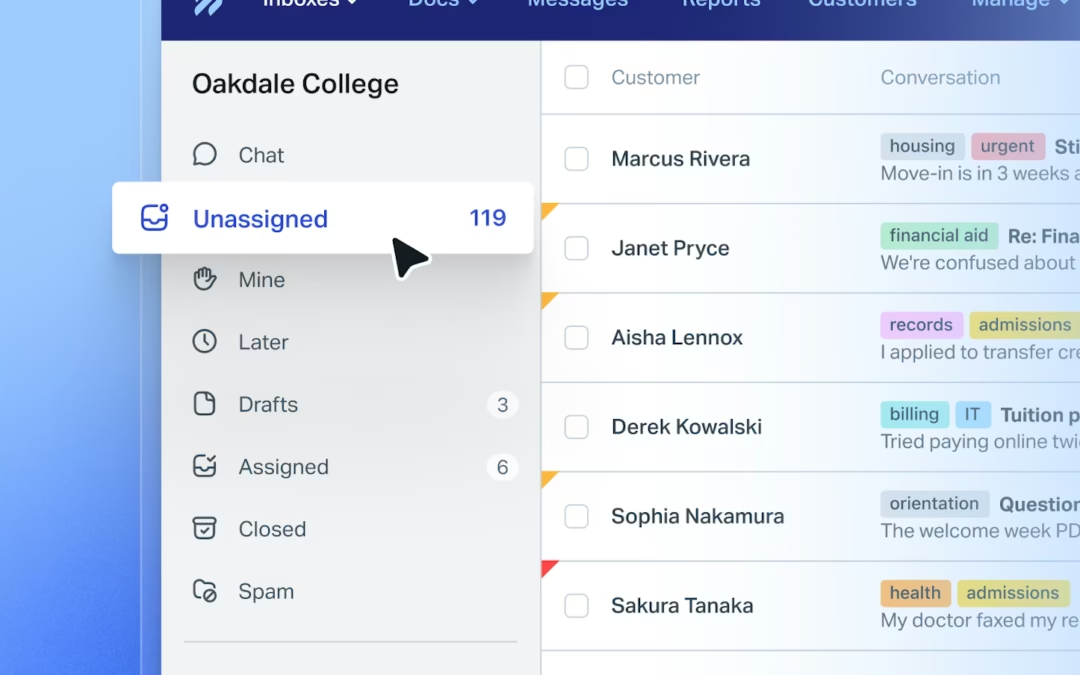
Unlike traditional ticketing systems that assign numerical identifiers and rigid workflows, Help Scout structures conversations in a more email-like format. This design choice reflects an attempt to maintain a natural communication style while still providing organizational tools for teams.
The platform integrates multiple support channels into a unified interface, allowing teams to manage email-based queries, live chat interactions, and self-service documentation from a single environment. It is commonly used by small to medium-sized businesses, as well as larger organizations seeking a less complex alternative to enterprise-grade systems.
Key Features Explained
Shared Inbox System
At the core of Help Scout is its shared inbox functionality. This feature allows multiple team members to access, assign, and respond to customer conversations collaboratively. Instead of forwarding emails internally, team members can leave private notes, assign conversations, and track progress within the same interface.
Knowledge Base (Docs)
Help Scout includes a built-in knowledge base feature, often referred to as “Docs.” This allows organizations to create and manage self-service articles that address common customer questions. The knowledge base can reduce repetitive inquiries by providing users with accessible information before they contact support.
Live Chat Integration
The platform supports real-time communication through a live chat feature. This enables support teams to engage with customers directly on their websites. Conversations initiated through chat are stored alongside email interactions, ensuring continuity in communication.
Automation and Workflows
Automation tools within Help Scout allow teams to define rules for handling incoming messages. For example, conversations can be automatically tagged, assigned, or prioritized based on specific criteria such as keywords or customer history. This reduces manual sorting and helps maintain consistency.
Reporting and Analytics
Help Scout provides reporting tools that track metrics such as response time, conversation volume, and customer satisfaction ratings. These insights can be used to evaluate team performance and identify operational bottlenecks.
Customer Profiles
Each customer interaction is linked to a profile that includes previous conversations, notes, and relevant details. This context allows support agents to respond more effectively without requiring customers to repeat information.
Integrations
The platform integrates with a range of third-party tools, including CRM systems, e-commerce platforms, and project management software. These integrations help extend functionality and align support operations with other business processes.
Common Use Cases
Email-Based Customer Support
Organizations that primarily handle customer inquiries via email often use Help Scout to organize and streamline responses. The shared inbox replaces traditional email clients with a more structured environment.
SaaS Customer Support Teams
Software-as-a-service companies frequently rely on Help Scout to manage onboarding questions, technical support, and feature-related inquiries. The knowledge base is particularly useful for documenting product guidance.
E-commerce Support Operations
Online retailers use the platform to manage order-related questions, returns, and shipping issues. Integration with e-commerce systems allows support agents to access order details within conversations.
Remote and Distributed Teams
Teams working across different locations benefit from centralized communication tools. Help Scout enables collaboration without requiring team members to be physically present or use separate communication channels.
Self-Service Support Systems
Organizations aiming to reduce support workload often use the Docs feature to build comprehensive knowledge bases. This supports a shift toward self-service customer support models.
Potential Advantages
Simplicity of Interface
Help Scout is often noted for its relatively straightforward user interface. Compared to more complex help desk systems, it presents fewer barriers to adoption, particularly for smaller teams.
Email-Like Experience
The platform’s design prioritizes a conversational format that resembles traditional email. This can make interactions feel more personal and less transactional from a customer perspective.
Centralized Communication
By consolidating email, chat, and documentation into a single platform, Help Scout reduces fragmentation. This centralization improves visibility and coordination among team members.
Scalable Features
While initially suitable for small teams, Help Scout includes features such as automation and reporting that support scaling operations over time.
Knowledge Base Integration
The inclusion of a built-in knowledge base allows organizations to create a unified support ecosystem. Customers can find answers independently, reducing reliance on direct support channels.
Limitations & Considerations
Limited Advanced Customization
Compared to enterprise-level help desk systems, Help Scout offers fewer options for deep customization. Organizations with highly specialized workflows may find this restrictive.
Dependence on Internet Connectivity
As a cloud-based platform, Help Scout requires stable internet access. This may present challenges in environments with unreliable connectivity.
Feature Scope
While the platform covers core support functions, it may not include advanced capabilities such as complex ticket routing logic or extensive AI-driven automation found in some competitors.
Pricing Structure
Although not the focus of this discussion, cost considerations can influence adoption. Teams must evaluate whether the available features align with their operational needs.
Learning Curve for Advanced Features
Basic usage is relatively straightforward, but more advanced features such as automation workflows and reporting may require additional time to configure effectively.
Who Should Consider Help Scout
Help Scout may be relevant for organizations that prioritize simplicity and clarity in customer communication. It is often suitable for:
- Small to medium-sized businesses managing moderate support volumes
- Teams transitioning from traditional email systems to structured support tools
- Organizations seeking a balance between functionality and ease of use
- Customer support teams that rely heavily on email communication
- Businesses interested in integrating self-service knowledge bases
It can also be useful for teams that prefer a less technical interface and do not require extensive customization.
Who May Want to Avoid It
Certain organizations may find Help Scout less aligned with their needs. These include:
- Enterprises requiring highly customized workflows and advanced automation
- Teams managing extremely high volumes of support tickets with complex routing requirements
- Organizations seeking extensive AI-driven support features
- Businesses that depend on offline functionality or on-premise solutions
- Technical teams requiring deep system integrations beyond standard offerings
In such cases, alternative platforms with broader feature sets may be more appropriate.
Comparison With Similar Tools
Help Scout operates within a competitive landscape that includes platforms such as Zendesk, Freshdesk, and Intercom.
Zendesk is often recognized for its extensive customization options and enterprise-level capabilities. It supports complex workflows and large-scale operations but may involve a steeper learning curve.
Freshdesk provides a balance between usability and feature depth, offering automation tools and multi-channel support. It is commonly used by businesses seeking flexibility without full enterprise complexity.
Intercom focuses more heavily on real-time customer engagement, including chat-based interactions and marketing automation. Its approach differs from Help Scout’s emphasis on email-style communication.
In comparison, Help Scout tends to prioritize simplicity and a human-centered communication style. It may be more approachable for teams that do not require extensive configuration or advanced automation.
Final Educational Summary
Help Scout represents a particular approach within the broader category of customer support software. By emphasizing shared inboxes, knowledge base integration, and conversational communication, it addresses common challenges associated with managing customer interactions.
Its design reflects a balance between functionality and usability, making it accessible to teams seeking structured support tools without the complexity of enterprise systems. However, this simplicity also introduces limitations, particularly for organizations with advanced operational requirements.
Understanding the role of Help Scout within the ecosystem of customer support platforms requires consideration of factors such as team size, support volume, workflow complexity, and integration needs. As with any tool in this category, its effectiveness depends on how well it aligns with specific organizational contexts.
Disclosure: This article is for educational and informational purposes only. Some links on this website may be affiliate links, but this does not influence our editorial content or evaluations.