
Introduction
Digital systems have become deeply integrated into everyday work and communication. Businesses, freelancers, research teams, and remote workers routinely interact with dozens—or sometimes hundreds—of online accounts. Email platforms, project management software, payment gateways, databases, and cloud storage tools all require authentication credentials. As the number of accounts grows, so does the complexity of managing secure login information.
Historically, individuals relied on simple strategies to keep track of passwords: handwritten notes, spreadsheet lists, or memory-based variations of a single password. These approaches often created vulnerabilities. Weak password reuse, lost documentation, and insecure storage methods contributed to data breaches and unauthorized access incidents.
The broader cybersecurity industry has responded to this challenge by developing password management tools. These systems aim to organize, encrypt, and control access to login credentials across multiple users and devices. Many also provide collaborative features that allow teams to share credentials securely without exposing them in plain text.
One such tool in this category is Passpack. Positioned within the cloud password management ecosystem, it focuses on encrypted credential storage and controlled password sharing for individuals and teams. Understanding how platforms like Passpack operate can provide insight into the broader field of digital identity management and online security practices.
What Is Passpack?
Passpack is a cloud-based password management platform designed to store, organize, and share login credentials in an encrypted environment. It belongs to the category of password managers that prioritize secure storage and controlled collaboration.
Unlike traditional password storage methods—such as spreadsheets or locally stored files—Passpack uses encryption technologies to protect stored credentials. Access to the stored data typically requires a master authentication method, which acts as the primary key to unlock the password vault.
A distinguishing characteristic of Passpack is its focus on secure password sharing. Many teams need access to shared accounts, such as social media profiles, administrative dashboards, or client systems. Instead of distributing passwords through email or messaging platforms, Passpack provides a mechanism that allows credentials to be shared without exposing the underlying password in plain text.
As a cloud-based system, Passpack can be accessed through a web interface. This architecture allows users to retrieve or manage passwords from different devices while maintaining centralized encryption controls.
In the broader taxonomy of digital security tools, Passpack falls under:
- Cloud password managers
- Team credential management platforms
- Encrypted password storage systems
- Collaborative password sharing tools
These tools are increasingly relevant as organizations transition toward remote work environments and distributed digital infrastructures.
Key Features Explained
Encrypted Password Storage
At the core of Passpack is encrypted password storage. Encryption converts readable data into a coded format that requires a cryptographic key for access. In password management platforms, this process ensures that stored credentials cannot be easily interpreted if unauthorized access occurs.
Encrypted storage helps protect sensitive login details such as:
- Email credentials
- Web application logins
- API keys
- Administrative dashboard accounts
- Client account credentials
By storing these details within an encrypted vault, the system reduces reliance on insecure documentation methods.
Password Sharing Without Direct Exposure
Many organizations face a common challenge: multiple users need access to the same account. Sharing a password directly through email, chat, or documents creates risks because the password becomes visible and can be copied or forwarded.
Passpack introduces a controlled sharing system. Instead of revealing the password itself, the platform can grant a user permission to access the account through the encrypted system. The receiving user can log in through the platform while the actual password remains hidden.
This approach supports collaborative workflows while reducing exposure of sensitive credentials.
Permission-Based Access Control
Another feature commonly associated with collaborative password managers is role-based access. Passpack allows users to define who can view, edit, or use stored credentials.
For example, a team administrator might:
- Allow a colleague to use a password without revealing it
- Grant editing permissions for updating credentials
- Restrict access to sensitive administrative accounts
Permission structures are particularly relevant for companies where multiple departments interact with shared systems.
Centralized Password Organization
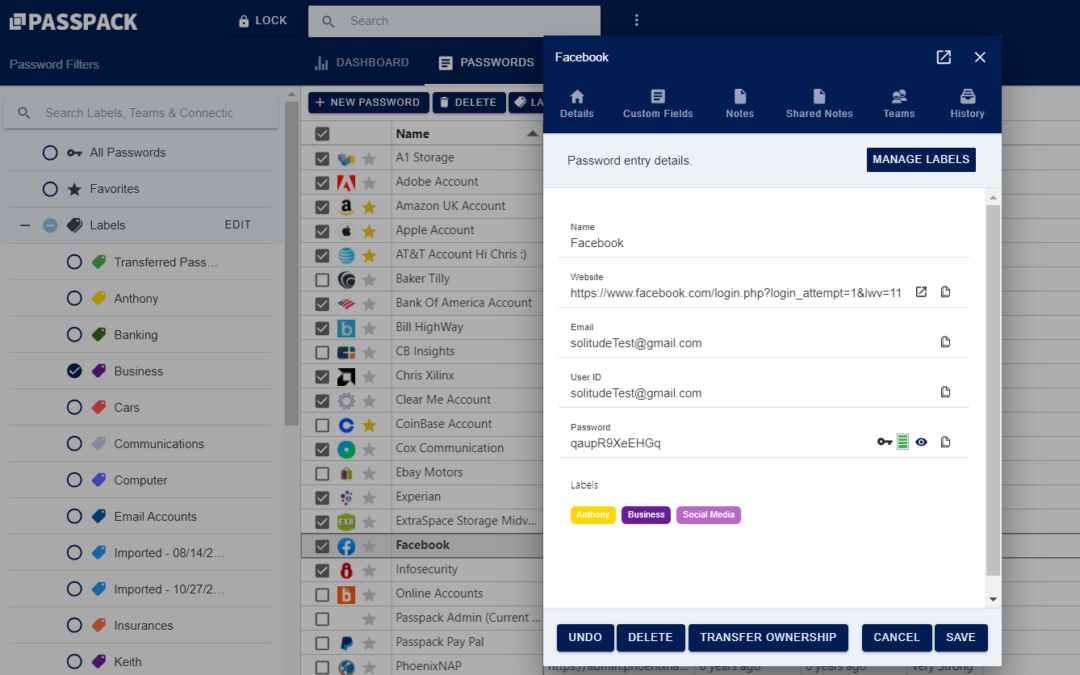
Managing dozens of credentials can become difficult without an organized structure. Password management systems typically include categorization features that allow users to group passwords by project, department, or service type.
Within Passpack, passwords can be stored in a structured format that allows easier retrieval. This is useful for teams managing accounts across multiple platforms, such as marketing dashboards, hosting services, and internal tools.
Web-Based Access Environment
Passpack operates through a web-based interface. Cloud-based access allows users to retrieve credentials from various locations and devices without relying on a specific local installation.
This model reflects a broader trend in cybersecurity tools toward centralized cloud systems that support distributed teams.
However, cloud-based systems also require careful authentication procedures to ensure that access remains secure.
Common Use Cases
Password management platforms such as Passpack appear in several operational environments.
Small Business Credential Management
Small organizations often operate multiple online services with limited IT infrastructure. Password managers provide a structured way to store and share credentials among employees without relying on informal communication methods.
Remote Team Collaboration
Remote work has increased the need for secure credential sharing across geographic locations. Teams working from different regions may need access to shared accounts for project management, analytics, or content publishing.
Passpack can function as a centralized repository where authorized team members access the credentials required for their roles.
Digital Agencies Managing Client Accounts
Agencies frequently manage accounts on behalf of multiple clients. These may include website hosting dashboards, advertising platforms, and analytics systems.
Using a password manager helps organize client credentials while maintaining separation between projects.
IT and System Administration
IT administrators often manage a large number of service accounts and system credentials. A password management system provides a structured environment for storing and auditing these credentials.
Freelancers Working Across Multiple Platforms
Freelancers may interact with numerous digital services, including collaboration tools, payment processors, and publishing platforms. Password managers help centralize account information and reduce the likelihood of forgotten credentials.
Potential Advantages
Password management tools are designed to address several challenges associated with credential security.
Reduced Password Reuse
One of the most common cybersecurity vulnerabilities is password reuse. When users rely on a single password across multiple accounts, a breach in one service can compromise many others.
Password managers make it easier to maintain unique credentials for different services.
Improved Organizational Control
Centralized credential storage allows organizations to track which users have access to specific accounts. When team members change roles or leave an organization, administrators can adjust permissions accordingly.
Secure Collaboration
Collaborative password management systems enable teams to work together without exposing sensitive credentials through insecure communication channels.
Streamlined Account Access
Rather than searching through documents or requesting login details from colleagues, authorized users can retrieve credentials from a centralized system.
Encrypted Data Protection
Encryption helps ensure that stored password information remains protected from unauthorized access attempts.
Limitations & Considerations
While password management tools offer practical advantages, they also introduce certain considerations.
Dependence on Master Authentication
Many password managers rely on a master password or authentication method. If this master credential is lost, accessing stored data can become difficult or impossible.
Users must therefore maintain strong and secure master authentication practices.
Cloud Security Concerns
Because Passpack operates as a cloud-based system, stored data resides on remote servers rather than on a user’s local device. Some organizations prefer on-premise security solutions that maintain complete internal control over data storage.
Cloud systems require trust in the platform’s encryption and security infrastructure.
Learning Curve for Teams
Implementing a password management system may require training, particularly for teams transitioning from informal password-sharing methods.
Users must understand how to grant permissions, organize credentials, and follow secure access procedures.
Integration Limitations
Some password managers integrate deeply with browsers or enterprise systems, while others maintain simpler web-based interfaces. Depending on the workflow requirements, certain organizations may prefer tools with broader integration capabilities.
Who Should Consider Passpack
Passpack may be relevant to several types of users.
Small Teams Handling Shared Accounts
Organizations where multiple employees require access to the same platforms may benefit from a structured credential-sharing system.
Agencies Managing Client Credentials
Digital marketing agencies, development teams, and consultants often manage multiple external accounts. A centralized password manager helps maintain organization and security.
Remote Work Environments
Distributed teams frequently need secure credential access from different locations. Cloud-based password managers support this operational model.
Professionals Managing Many Online Services
Individuals who interact with numerous online platforms may find value in a structured password vault that reduces reliance on memory or unsecured notes.
Who May Want to Avoid It
Certain users may prefer alternative approaches.
Organizations Requiring On-Premise Security
Companies with strict regulatory requirements may choose password management systems that operate entirely within internal infrastructure.
Users Who Prefer Offline Storage
Some individuals prefer locally stored password managers that do not rely on cloud access.
Minimal Account Users
People managing only a small number of accounts may not require a full password management platform.
Comparison With Similar Tools
Passpack exists within a competitive ecosystem of password management platforms. While many tools share similar goals, their design priorities differ.
Cloud Password Managers
Many password managers operate entirely through cloud platforms. These typically emphasize accessibility across multiple devices and remote teams.
Enterprise Credential Management Systems
Larger enterprise solutions often integrate with identity management frameworks and single sign-on systems. These platforms may include advanced auditing and compliance features.
Local Password Vault Applications
Some password managers store encrypted vaults directly on user devices rather than remote servers. These tools appeal to individuals who prefer local control over cloud storage.
Browser-Based Password Storage
Modern browsers include built-in password storage systems. While convenient, they generally offer fewer collaboration features compared with dedicated password management platforms like Passpack.
Final Educational Summary
The growing complexity of digital workflows has made credential management a critical aspect of online security. As individuals and organizations rely on numerous web-based services, maintaining secure and organized access credentials becomes increasingly difficult without specialized tools.
Password management systems address this challenge by providing encrypted storage, controlled sharing mechanisms, and centralized credential organization. These systems help reduce password reuse, improve collaboration security, and streamline access to digital services.
Passpack represents one example within the cloud password management category. Its design focuses on encrypted credential storage and permission-based password sharing, particularly for teams that require shared access to online accounts.
While tools in this category can support improved security practices, their effectiveness depends on proper implementation, strong authentication practices, and user awareness of potential limitations.
As cybersecurity continues to evolve, password managers remain one of several strategies used to protect digital identities and manage access across increasingly complex online environments.