
Introduction
Across the digital health and wellness sector, practitioners increasingly rely on software systems to manage client interactions, scheduling, documentation, and communication. As independent practitioners, clinics, and coaching businesses expand, the administrative load often grows alongside client demand. Managing appointments, tracking client progress, handling billing, and maintaining secure communication channels can become fragmented when handled across multiple tools.
This operational complexity has contributed to the rise of integrated practice management platforms. These tools aim to centralize workflows into a single system, reducing the need for separate applications. Within this category, Practice Better is one of several platforms designed specifically for health professionals seeking to streamline administrative and client-facing processes.
Learn More About Practice Better
What Is Practice Better?
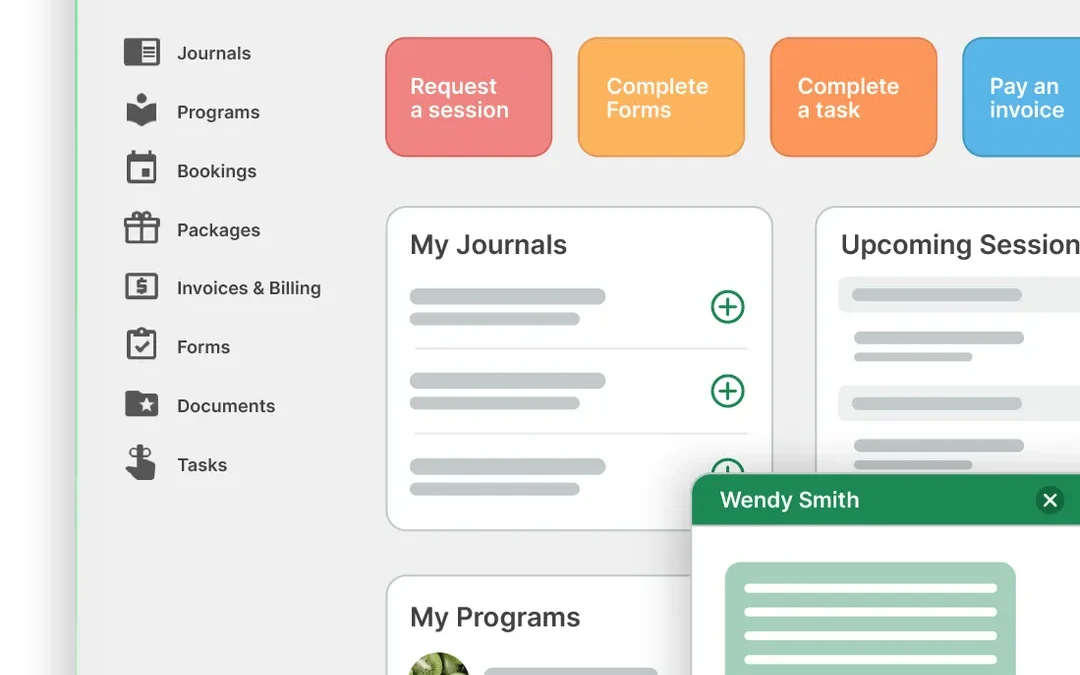
Practice Better is a cloud-based practice management software developed for professionals in the health, wellness, and coaching industries. It combines scheduling, client management, communication tools, and business operations into a unified interface.
The platform is typically categorized under:
- Practice management software
- Client management systems (CMS)
- Telehealth and virtual care platforms
- Wellness business automation tools
Practice Better is used by professionals such as nutritionists, dietitians, health coaches, therapists, and other service-based practitioners who need structured client engagement alongside operational oversight.
Rather than functioning as a single-purpose tool, Practice Better operates as an all-in-one system intended to replace multiple standalone applications.
Key Features Explained
Client Management and Records
One of the core components of Practice Better is its client management system. Practitioners can maintain detailed client profiles, including personal information, health history, session notes, and uploaded documents.
The system allows structured record-keeping, which is particularly relevant for professionals who require consistent documentation across sessions. Templates can be used to standardize intake forms and progress tracking.
Appointment Scheduling and Calendar Integration
Practice Better includes an integrated scheduling system that enables practitioners to set availability, manage bookings, and coordinate sessions. Clients can request or book appointments based on predefined time slots.
Calendar synchronization is available with external calendar tools, helping users avoid double bookings and maintain a consolidated view of their schedule.
Secure Messaging and Communication
Communication within Practice Better is handled through built-in messaging tools. Practitioners and clients can exchange messages, share updates, and maintain communication records within the platform.
This feature is particularly relevant in contexts where maintaining a record of communication is important for continuity and accountability.
Telehealth and Virtual Sessions
The platform supports virtual consultations through integrated video conferencing. This allows practitioners to conduct sessions remotely without relying on third-party video tools.
Telehealth functionality has become increasingly relevant in remote care delivery, especially in nutrition, therapy, and coaching services.
Billing and Payments
Practice Better includes billing features such as invoicing, payment tracking, and integration with payment gateways. Practitioners can generate invoices for sessions, packages, or services and monitor payment status.
This functionality reduces reliance on separate accounting or payment tools for basic financial operations.
Forms, Assessments, and Program Delivery
The platform enables practitioners to create customizable forms and questionnaires. These can be used for client intake, feedback collection, or ongoing assessments.
Additionally, practitioners can design structured programs, including step-by-step plans, resources, and check-ins, which are delivered to clients through the platform.
Automation and Workflow Tools
Practice Better includes automation features such as appointment reminders, follow-up messages, and workflow triggers. These reduce manual administrative tasks and help maintain consistent client engagement.
Automation can be configured based on client actions, time intervals, or predefined workflows.
Common Use Cases
Independent Health Practitioners
Solo practitioners often use Practice Better to manage their entire workflow—from onboarding new clients to conducting sessions and tracking progress.
Nutrition and Diet Planning
Dietitians and nutritionists use the platform to deliver meal plans, monitor client adherence, and track health metrics over time.
Coaching and Wellness Programs
Health coaches and wellness professionals use Practice Better to structure programs, assign tasks, and maintain regular communication with clients.
Telehealth Services
Professionals offering remote consultations rely on the integrated video and messaging features to deliver care without in-person visits.
Small Clinics and Group Practices
Small teams use the platform to coordinate schedules, manage shared client records, and standardize workflows across practitioners.
Potential Advantages
Centralized Workflow Management
Practice Better consolidates multiple operational tasks into a single system. This can reduce the need to switch between different tools for scheduling, communication, and record-keeping.
Customization Options
The platform provides flexibility in designing forms, programs, and workflows. This allows practitioners to tailor the system to their specific practice requirements.
Improved Client Engagement
Features such as messaging, reminders, and structured programs can support ongoing client interaction. This may help practitioners maintain consistent communication without relying on external channels.
Remote Service Delivery
Built-in telehealth functionality supports remote consultations, which can expand access to clients in different locations.
Administrative Efficiency
Automation features can reduce repetitive tasks such as sending reminders or follow-ups, potentially improving time management.
Limitations & Considerations
Learning Curve
As with many comprehensive platforms, Practice Better may require time to learn. Users unfamiliar with integrated systems may need to invest effort in understanding its features and workflows.
Cost Structure
The platform operates on a subscription model, which may be a consideration for individuals or small practices with limited budgets.
Feature Overlap for Simple Needs
For practitioners with minimal requirements, the range of features may exceed their needs. In such cases, simpler tools might be more appropriate.
Dependence on Internet Connectivity
Being a cloud-based system, Practice Better requires reliable internet access. Interruptions in connectivity can affect usability.
Data Migration Challenges
Practitioners transitioning from other systems may face challenges when transferring existing client data into the platform.
Who Should Consider Practice Better
Practice Better may be relevant for:
- Health professionals managing multiple clients regularly
- Practitioners offering structured programs or ongoing coaching
- Professionals needing integrated scheduling, communication, and billing
- Remote service providers conducting virtual consultations
- Small teams requiring shared access to client data
Those who benefit most are typically individuals or organizations seeking to consolidate multiple workflows into one platform.
Who May Want to Avoid It
Practice Better may not be ideal for:
- Practitioners with very limited client interaction
- Individuals seeking only a basic scheduling tool
- Users preferring standalone, specialized applications
- Those with minimal need for automation or program delivery
- Professionals operating entirely offline
In such cases, simpler or more narrowly focused tools may be sufficient.
Comparison With Similar Tools
Practice Better vs Simple Scheduling Tools
Unlike basic appointment scheduling software, Practice Better integrates client records, communication, and billing. Scheduling tools alone typically lack these additional features.
Practice Better vs Electronic Health Record (EHR) Systems
While EHR systems focus heavily on clinical documentation, Practice Better includes broader business management features. However, it may not match the depth of specialized medical record systems in highly regulated environments.
Practice Better vs Coaching Platforms
Compared to coaching-specific tools, Practice Better offers more robust health-related features such as assessments and client records. Coaching platforms may focus more on goal tracking and communication.
Practice Better vs All-in-One Business Tools
General business management tools often lack industry-specific features such as health assessments or telehealth integration. Practice Better is tailored more specifically to health and wellness professionals.
Final Educational Summary
Practice Better represents a category of integrated practice management platforms designed to streamline operations for health and wellness professionals. By combining scheduling, communication, client management, and billing into a single system, it addresses common challenges associated with fragmented workflows.
Its feature set supports a range of use cases, from solo practitioners to small teams, particularly those offering structured programs or remote services. However, the platform’s breadth may not suit every user, especially those with minimal operational needs or preferences for simpler tools.
Evaluating Practice Better requires consideration of workflow complexity, client volume, and the need for integrated functionality. As with any software system, alignment between tool capabilities and user requirements plays a central role in determining its suitability.
Disclosure: This article is for educational and informational purposes only. Some links on this website may be affiliate links, but this does not influence our editorial content or evaluations.