
Introduction
Digital calendars have evolved far beyond simple scheduling utilities. Modern knowledge work often involves balancing meetings, deep work, collaborative tasks, and personal commitments within increasingly fragmented workdays. As organizations adopt remote and hybrid workflows, managing time efficiently has become a persistent challenge.
Traditional calendar systems allow users to schedule events manually, but they rarely adapt dynamically to changing priorities or workloads. Workers frequently experience calendar congestion, fragmented focus periods, and overlapping commitments. These issues have contributed to the rise of automated time-management platforms that attempt to optimize schedules through algorithmic planning.
Within this category of productivity technology, artificial intelligence–driven scheduling tools have emerged as a specialized segment. These platforms attempt to automatically allocate time for tasks, protect focused work periods, and rebalance calendars when new events appear. One example of this emerging class of software is Reclaim.
Understanding how tools like Reclaim operate requires examining the broader ecosystem of productivity software, the features they introduce, and the limitations that accompany automated scheduling systems.
What Is Reclaim?
Reclaim is an AI-assisted scheduling and time management platform designed to integrate with digital calendars. The software focuses on automatically organizing work schedules by balancing meetings, tasks, habits, and focus time within a single calendar environment.
Rather than acting purely as a meeting scheduler, Reclaim functions as a calendar optimization system. It analyzes available time blocks, task priorities, deadlines, and existing commitments to distribute activities across a user’s schedule. When conflicts arise—such as new meetings or changes in availability—the system attempts to rearrange lower-priority items automatically.
The platform belongs to the broader category of AI productivity tools, particularly within the subset of automated scheduling software and calendar optimization platforms. These systems aim to reduce the manual effort required to manage time across complex schedules.
Reclaim generally integrates with widely used calendar infrastructures such as those associated with enterprise productivity suites. Through this integration, it can read scheduled events and modify time blocks in response to evolving priorities.
In practice, the software acts as a layer on top of an existing calendar rather than replacing it. Users continue interacting with their primary calendar interface while Reclaim operates in the background to maintain scheduling logic.
Key Features Explained
Intelligent Task Scheduling
One of the central capabilities of Reclaim is automated task placement. Instead of manually assigning a task to a specific time slot, users can define the task, estimated duration, priority level, and deadline. The system then identifies appropriate openings in the calendar to complete the work.
If higher-priority meetings appear later, Reclaim can shift lower-priority tasks to different times while preserving deadlines where possible.
Focus Time Protection
Focus blocks are intended to protect uninterrupted work periods. Many workers find that meetings fragment their day into small segments, reducing productivity for complex tasks.
Reclaim attempts to reserve dedicated blocks for focused work. When scheduling new meetings, the platform may adjust these blocks, but the underlying objective is to maintain sufficient uninterrupted time for concentrated activity.
Habit Scheduling
Another distinctive component is habit planning. Users can define recurring activities such as exercise, study sessions, or routine administrative tasks.
Rather than fixing these activities at rigid times, Reclaim can schedule them flexibly throughout the week while respecting defined frequency targets. If a conflict occurs, the system may relocate the habit to another available period.
Meeting Coordination and Buffering
Calendar congestion often occurs when meetings are scheduled back-to-back without transition time. Reclaim introduces scheduling buffers that create short intervals before or after meetings.
These buffers can help prevent situations where consecutive meetings leave no time for preparation, follow-up tasks, or brief rest periods.
Calendar Synchronization
Reclaim operates through synchronization with existing calendar platforms. This allows it to monitor events, analyze scheduling conflicts, and adjust tasks automatically.
Users typically maintain their normal scheduling workflow while the system manages background optimization.
Smart Priority Rules
Tasks, meetings, and habits can be assigned priority levels. These priorities influence how the platform rearranges events when conflicts arise.
For example, a high-priority deadline task may be preserved, while lower-priority activities are moved or postponed.
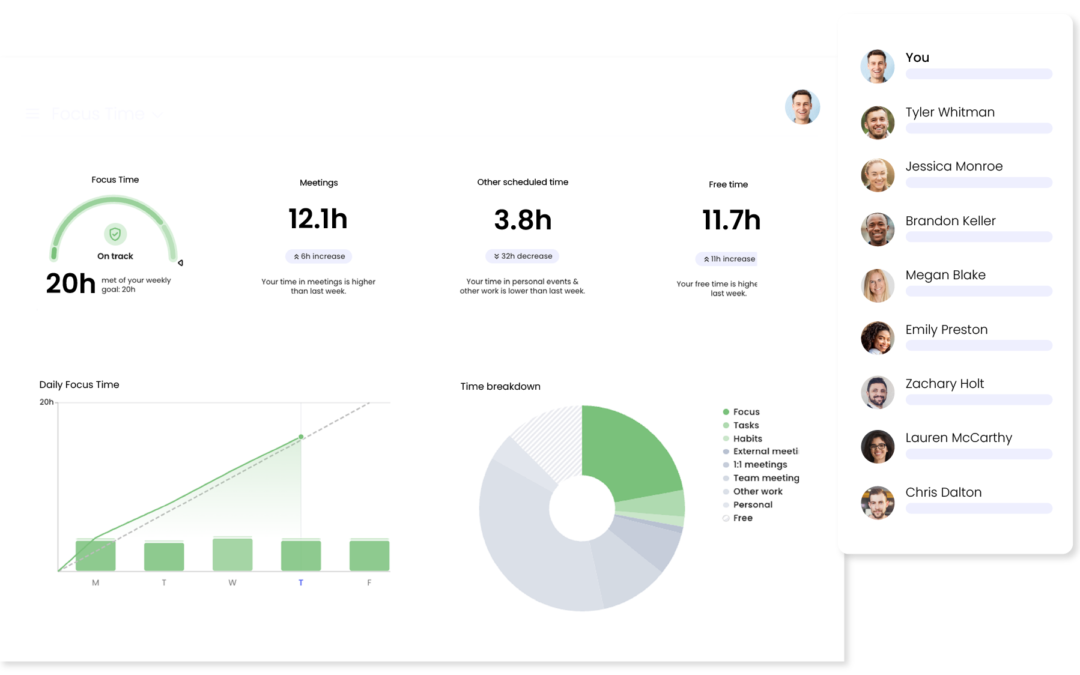
Time Tracking and Insights
Some versions of Reclaim include analytics about time allocation. These insights can reveal patterns such as:
- Time spent in meetings
- Focus hours available each week
- Distribution of tasks across categories
- Schedule density and workload balance
Such data may assist individuals or teams in evaluating how their time is structured.
Common Use Cases
AI-driven scheduling tools like Reclaim are often used in environments where calendar complexity is high and manual scheduling becomes inefficient.
Managing Knowledge Work
Knowledge workers frequently juggle project tasks, meetings, and research work. Reclaim can automatically distribute work sessions throughout the calendar while maintaining flexibility for meetings.
Coordinating Remote Teams
Remote and distributed teams often operate across multiple time zones and overlapping calendars. Automated scheduling systems may help reduce manual adjustments when meetings shift.
Protecting Deep Work
Professionals who require sustained focus—such as developers, analysts, and writers—may use automated focus blocks to prevent excessive interruptions.
Personal Time Management
Although many productivity tools are designed for business environments, some individuals use platforms like Reclaim to manage personal commitments, habits, and routines alongside professional obligations.
Balancing Multiple Projects
Project managers or consultants who work across multiple initiatives may benefit from task scheduling that automatically reallocates time when priorities change.
Potential Advantages
Reduced Manual Scheduling Effort
One frequently cited advantage of automated calendar systems is the reduction in manual scheduling tasks. Instead of continuously rearranging time blocks, the software performs adjustments based on predefined rules.
Adaptive Scheduling
Schedules rarely remain static. Meetings are added, deadlines change, and tasks expand unexpectedly. AI scheduling tools attempt to adapt dynamically to these changes.
Improved Calendar Visibility
Platforms like Reclaim can provide a consolidated view of commitments, including work tasks, meetings, and recurring habits. This integrated perspective may help users better understand how their time is allocated.
Focus Time Preservation
Maintaining uninterrupted work periods is a common challenge in collaborative work environments. Automated focus protection can help preserve time for complex tasks.
Structured Habit Integration
Traditional calendars often treat personal routines as fixed appointments. Flexible habit scheduling introduces more adaptability, allowing recurring activities to fit around shifting workloads.
Limitations & Considerations
Despite the potential benefits, AI scheduling tools also present several practical limitations.
Dependence on Calendar Accuracy
The effectiveness of automated scheduling depends heavily on accurate calendar data. If users fail to record commitments or update availability, the system may produce unrealistic schedules.
Algorithmic Constraints
While automation can optimize scheduling based on rules, it may not always reflect nuanced human preferences. For example, a system might schedule cognitively demanding tasks during periods when the user personally feels less productive.
Learning Curve
Some users may require time to understand how priority rules, habit scheduling, and task allocation work within the platform. Misconfigured settings can produce unintended scheduling outcomes.
Calendar Over-Automation
In certain situations, excessive automation can create confusion. When the system frequently moves tasks around, users may struggle to predict when work will actually occur.
Privacy and Data Considerations
Calendar management systems typically access detailed information about meetings, work tasks, and personal routines. Organizations often evaluate data privacy policies before adopting such tools.
Integration Limitations
Not all digital workflows integrate seamlessly with automated scheduling platforms. For example, task management systems, project tracking tools, or internal communication platforms may require additional configuration.
Who Should Consider Reclaim
Automated calendar optimization tools are generally most relevant for individuals and teams experiencing complex scheduling demands.
Professionals With Meeting-Heavy Schedules
Managers, consultants, and team leads often face calendars filled with meetings. A scheduling optimizer can help distribute remaining time more efficiently.
Remote and Hybrid Workers
Distributed work environments frequently introduce fragmented schedules. AI scheduling tools may help balance time across asynchronous collaboration and independent tasks.
Individuals Managing Multiple Responsibilities
Freelancers, researchers, or students working across multiple projects may find value in automated task placement that adapts to shifting priorities.
Productivity Enthusiasts
Some users actively explore time-management frameworks such as time blocking or habit stacking. Tools like Reclaim can automate elements of these approaches.
Who May Want to Avoid It
Although automated scheduling platforms provide convenience for some users, they may not be suitable for everyone.
Individuals With Highly Predictable Schedules
People whose calendars rarely change—such as those with fixed daily routines—may gain little benefit from dynamic scheduling.
Users Who Prefer Manual Control
Some professionals prefer complete control over their schedule. Automated systems that move tasks automatically may feel disruptive rather than helpful.
Small Workloads or Minimal Task Planning
If a user manages only a few daily tasks, traditional calendar tools may already provide sufficient organization without additional automation.
Privacy-Sensitive Environments
Organizations with strict data governance requirements may be cautious about granting external platforms access to calendar metadata.
Comparison With Similar AI
The market for automated scheduling and calendar optimization software has expanded significantly in recent years. Several tools operate in related categories.
Motion
Motion is another AI scheduling platform focused on task automation and project scheduling. It places strong emphasis on integrating task management with calendar planning.
Compared with Motion, Reclaim places greater attention on habit scheduling and focus time preservation. Motion, by contrast, often centers more heavily on project task prioritization.
Clockwise
Clockwise focuses primarily on meeting optimization and collaborative scheduling within teams. Its algorithms attempt to rearrange meetings across multiple calendars to maximize shared focus time.
While Clockwise concentrates on team scheduling, Reclaim includes more personal task scheduling features.
Sunsama
Sunsama is a daily planning application designed around manual task scheduling and intentional workday planning.
Unlike Sunsama’s manual workflow, Reclaim emphasizes automated scheduling through algorithmic decision-making.
Traditional Calendar Platforms
Standard calendar applications provide basic scheduling functionality but typically lack dynamic task allocation and automated calendar rebalancing. AI scheduling tools attempt to fill this gap by introducing algorithmic time planning.
Final Educational Summary
Automated scheduling platforms represent a growing segment within the broader productivity software ecosystem. As work environments become more complex and meeting-heavy, many individuals search for ways to manage time more efficiently.
Reclaim operates within this category as an AI-assisted calendar optimization system. By integrating with existing calendar platforms, it attempts to organize tasks, habits, meetings, and focus blocks within a unified schedule. Its core features include automated task placement, dynamic schedule adjustments, habit planning, and focus time protection.
Like many algorithmic productivity tools, the platform offers potential advantages in reducing manual scheduling effort and adapting to shifting priorities. However, it also introduces considerations related to automation control, configuration complexity, and reliance on accurate calendar data.
Understanding how tools such as Reclaim function requires evaluating both the technical mechanisms behind automated scheduling and the practical realities of daily workflows. For some users, these systems may streamline calendar management. For others, traditional manual scheduling methods may remain sufficient.
As artificial intelligence continues to influence productivity software, calendar optimization platforms provide a case study in how automation can intersect with everyday work practices.
Disclosure: This article is for educational and informational purposes only. Some links on this website may be affiliate links, but this does not influence our editorial content or evaluations.