
Introduction
In digital marketing and online lead generation, landing pages play a central role in shaping user behavior. Unlike standard web pages, landing pages are designed with a single purpose—guiding visitors toward a specific action such as filling out a form, requesting information, or signing up for a service. As businesses increasingly depend on paid advertising, email campaigns, and targeted traffic sources, the effectiveness of landing pages becomes a measurable factor in overall marketing performance.
Unbounce is a platform developed to address this specific challenge. It focuses on allowing users to design, publish, and test landing pages without relying heavily on development resources. Over time, it has evolved to include conversion optimization tools, testing frameworks, and AI-assisted features aimed at improving performance metrics such as click-through rates and form submissions.
This article provides a complete, neutral, and educational overview of Unbounce. It examines how the platform works, its main components, typical use cases, strengths, limitations, and its position within the broader landing page software ecosystem.
What Unbounce Is and What It Does
Unbounce is a web-based platform designed for creating and optimizing landing pages. Its primary purpose is to help marketers build standalone pages that are separate from a main website and focused on a single conversion goal.
Rather than functioning as a general website builder, Unbounce concentrates on performance-driven pages. These pages are commonly used for advertising campaigns, email promotions, product launches, webinar registrations, and lead capture initiatives.
At its core, Unbounce combines three main functions:
- Visual landing page creation
- Conversion optimization through testing and analytics
- Traffic targeting and personalization
This structure allows users to experiment with page layouts, messaging, and user flows while collecting data on how visitors interact with each variation.
Landing Page Builder and Editing Environment
The landing page builder is the foundation of the Unbounce platform. It operates on a drag-and-drop interface that allows users to place elements freely on the page rather than locking them into rigid grid structures.
Design Flexibility
Users can add and modify common landing page components such as:
- Headings and text blocks
- Images and background sections
- Forms with custom fields
- Buttons and call-to-action elements
- Pop-ups and sticky bars
The editor emphasizes visual control, allowing precise placement and styling. This approach appeals to marketers who want design flexibility without writing code.
Templates and Customization
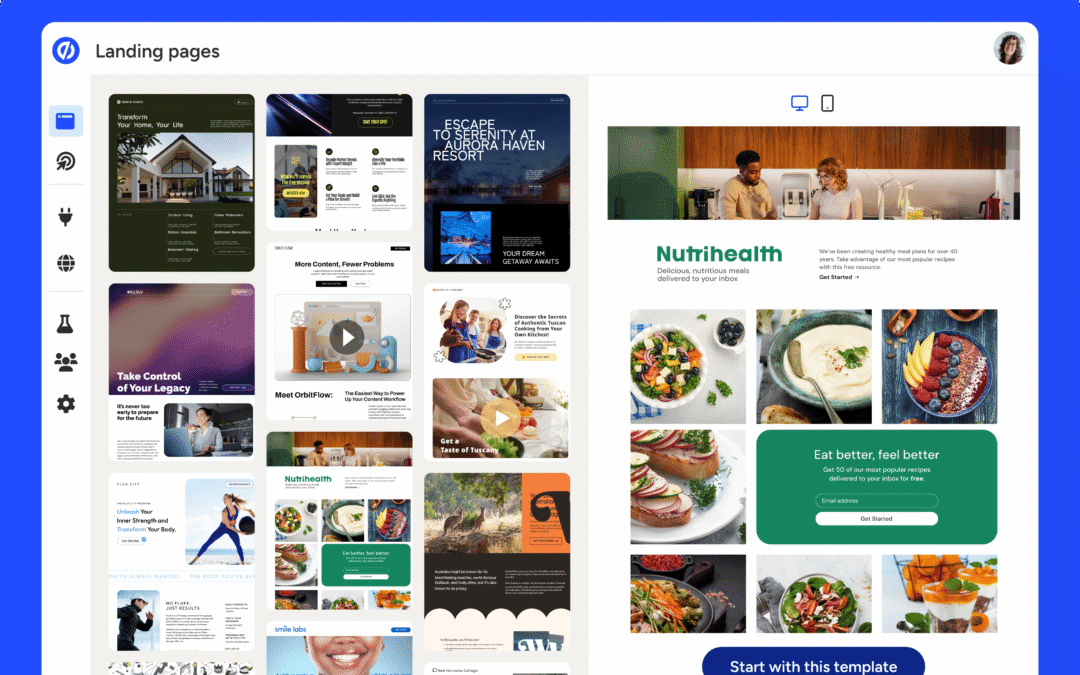
Unbounce provides a library of pre-designed templates organized by campaign type and industry. These templates serve as starting points and can be fully customized. Fonts, colors, spacing, and layout elements can all be adjusted to match brand guidelines.
While templates reduce setup time, users are not required to use them. Pages can also be built entirely from scratch.
Conversion-Focused Features
Beyond page creation, Unbounce integrates tools intended to improve conversion performance.
A/B Testing
A/B testing is a core feature of the platform. Users can create multiple variants of a landing page and split traffic between them. Each version can differ in layout, copy, imagery, or calls to action.
Performance metrics such as conversions and visits are tracked automatically. Over time, users can identify which variant performs better and direct traffic accordingly.
This testing capability allows data-driven decision-making rather than relying on assumptions about user behavior.
Dynamic Text Replacement
Dynamic text replacement enables landing pages to adjust content based on visitor search terms or campaign parameters. For example, a headline can change depending on the keyword that brought the visitor to the page.
This personalization technique is commonly used in paid advertising campaigns to maintain message consistency between ads and landing pages.
AI-Assisted Tools and Automation
In recent iterations, Unbounce has incorporated artificial intelligence features designed to streamline optimization tasks.
Smart Traffic
Smart Traffic automatically routes visitors to the landing page variant most likely to convert based on attributes such as location, device type, browser, and referral source. Unlike traditional A/B testing, Smart Traffic does not require a fixed testing period before optimization begins.
Instead, the system continuously learns from visitor behavior and adjusts routing in real time.
Copy and Layout Assistance
AI-driven suggestions may also assist with copy structure and page composition. These tools are designed to reduce guesswork during page creation, particularly for users with limited copywriting experience.
However, such features function as guidance rather than replacements for strategic planning or messaging development.
Integrations and Workflow Compatibility
Unbounce is typically used alongside other marketing and analytics tools rather than as a standalone system.
Marketing and CRM Integration
The platform supports integration with email marketing systems, customer relationship management tools, and analytics platforms. Form submissions can be sent directly to connected systems, enabling follow-up workflows and lead tracking.
Advertising Platforms
Landing pages built in Unbounce are often connected to advertising campaigns. The platform supports campaign tracking parameters, making it possible to evaluate performance by traffic source and keyword.
This integration capability positions Unbounce as part of a broader marketing technology stack rather than an isolated solution.
Typical Use Cases
Unbounce is most commonly used in scenarios where focused user actions and measurable outcomes are required.
Lead Generation Campaigns
Businesses running paid ads or promotional campaigns frequently use Unbounce to capture leads through forms. The ability to test headlines, form length, and layout helps refine performance.
Product and Service Promotions
Landing pages designed to highlight a single product or service offering benefit from Unbounce’s focused structure. These pages are often used for limited campaigns or targeted audiences.
Event Registrations and Sign-Ups
Webinars, online events, and gated content often rely on standalone registration pages. Unbounce supports these use cases with customizable forms and messaging control.
Strengths of the Platform
Several aspects of Unbounce stand out when evaluating its overall functionality.
- Strong emphasis on conversion optimization
- Visual editor with high design flexibility
- Built-in testing and traffic routing tools
- Suitable for non-technical users
- Designed specifically for campaign-driven pages
These strengths make it particularly useful for marketing teams that prioritize experimentation and measurable results.
Limitations and Considerations
Despite its capabilities, Unbounce may not be ideal for every scenario.
Learning Curve
While no coding is required, the level of design freedom can be overwhelming for beginners. Users may need time to understand best practices for layout and conversion design.
Narrow Focus
Unbounce is not intended to replace a full website builder or content management system. Organizations seeking blog management or multi-page navigation structures may require additional tools.
Cost Sensitivity
For smaller teams or individuals, pricing may be a consideration, particularly if advanced features are required. The platform is typically positioned toward professional marketing use rather than casual experimentation.
Position Within the Landing Page Software Market
Within the broader category of landing page builders, Unbounce occupies a conversion-centric position. It prioritizes testing, personalization, and data-driven optimization over general website creation.
Its feature set aligns most closely with marketing teams, agencies, and businesses running structured campaigns with defined performance goals.
Rather than competing on simplicity alone, Unbounce differentiates itself through optimization depth and experimentation capabilities.
Final Assessment
Unbounce is a specialized platform built around the idea that landing pages should be measurable, testable, and adaptable. Its tools are designed to help users refine messaging, layout, and targeting based on actual visitor behavior rather than assumptions.
For organizations focused on lead generation, advertising performance, and conversion optimization, it offers a structured environment for experimentation and iteration. At the same time, its narrow focus means it works best as part of a larger marketing toolkit rather than as a standalone web solution.
Understanding its strengths and limitations is essential for determining whether it aligns with specific campaign objectives and workflow requirements.
Disclosure
This article is written for educational and informational purposes only. It does not constitute advertising, endorsement, or promotional material for Unbounce or any related product or service. The content is based on publicly available information and general industry knowledge at the time of writing.
No compensation, sponsorship, or partnership has influenced the preparation of this article. Any trademarks, brand names, or product names mentioned remain the property of their respective owners. Readers should evaluate software platforms independently and determine suitability based on their own requirements, budgets, and use cases.