
Introduction
Organizations of all sizes face an increasingly intricate set of administrative tasks related to payroll processing, tax compliance, human resources (HR) administration, and employee benefits. For small and mid‑sized enterprises, in particular, these responsibilities often compete with core operational priorities such as service delivery, customer satisfaction, and strategic growth. In many cases, traditional workflows reliant on manual calculations, spreadsheets, and fragmented systems create inefficiencies and increase the risk of errors. These challenges are amplified by constantly changing tax laws, labor regulations, and benefits requirements that vary across regions.
It is within this environment that software solutions designed to streamline payroll and HR functions have become important fixtures in many organizational toolkits. These platforms aim to centralize critical workforce administrative tasks under a unified framework. One of the tools that has emerged in this category is Gusto, a cloud‑based platform intended to support payroll automation, benefits administration, and foundational HR management for businesses. This article offers a comprehensive and objective educational overview of Gusto, exploring its core capabilities, typical applications, potential benefits, limitations, and how it compares to other solutions in the HR technology landscape.
What Is Gusto?
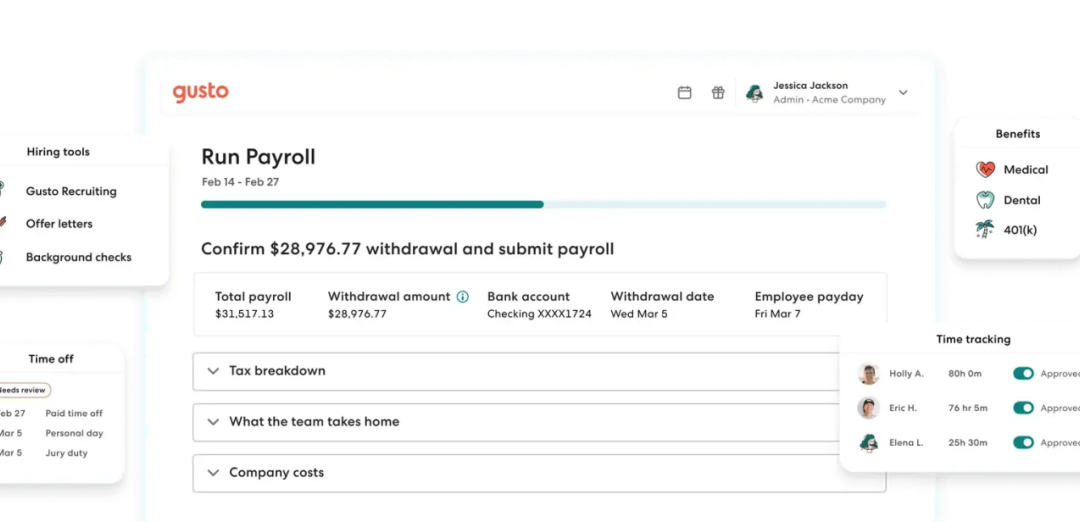
Gusto is a cloud‑hosted workforce management platform that integrates payroll processing with employee benefits administration and basic human resources features. Designed primarily for small to mid‑sized organizations, it seeks to reduce the administrative burden associated with calculating wages, managing tax withholdings, administering benefits plans, and maintaining employee records.
Classified within the broader spectrum of human resource technology, Gusto is often described as payroll software with extended HR functionality. Its focus on automation and centralization reflects a broader industry trend toward digital tools that help organizations manage HR‑related tasks that were once handled manually or through disconnected systems.
Unlike legacy systems that require significant configuration and technical expertise, Gusto presents itself with an interface and workflow intended to be accessible to users without deep payroll or HR specialization. The platform attempts to translate complex regulatory requirements into an automated process that supports accurate payroll runs, tax filings, and benefits deductions, while also serving as a repository for employee data.
Key Features Explained
To appreciate the functional scope of Gusto, it is helpful to examine its principal components and the problems they aim to address.
Payroll Processing and Automation
A central capability of Gusto is payroll processing. Payroll involves calculating gross pay, subtracting appropriate deductions, withholding relevant taxes, and disbursing net pay to employees. Gusto automates these calculations based on predefined employee information, hours worked, pay schedules, and regulatory data. The automation extends to payroll tax calculations and reporting, seeking to reduce the number of manual steps and lower the risk of human error.
The payroll engine is built to account for federal, state, and local tax requirements. When payroll is executed, the system produces documentation such as pay stubs and filings that can support reporting obligations and record‑keeping needs.
Integrated Tax Withholding and Filing
Beyond calculating payroll figures, Gusto includes functionality designed to handle tax withholding and submission processes. The platform processes federal and state tax withholdings according to current rules and, in many cases, can generate necessary forms for regulatory compliance. This aspect of the tool is particularly relevant for small businesses that may not have internal tax specialists on staff.
Benefits Administration
Another significant feature of Gusto is its benefits administration module. This component allows employers to manage employee eligibility, benefits elections, and payroll deductions for items such as health insurance and retirement savings plans. Rather than treating benefits as a standalone process, the platform seeks alignment between benefits elections and payroll calculations, enabling consolidated administration.
By bringing benefits management into the same environment as payroll, Gusto offers a single source of truth for deductions, contributions, and eligibility criteria.
Employee Self‑Service Portal
Gusto typically includes an employee self‑service interface, through which workers can access personal pay information, edit certain profile details, and retrieve tax documents. This decentralization of routine administrative queries is intended to reduce the workload on HR personnel and empower employees to take ownership of certain aspects of their information.
Time Tracking and Attendance
Some implementations of Gusto include tools for time tracking, allowing employees to record hours worked directly within the platform. When integrated with payroll processing, this feature seeks to streamline the transfer of recorded hours into accurate payroll calculations, removing the need for external spreadsheets or separate timekeeping systems.
HR Tools and Compliance
Gusto also provides foundational HR tools that assist with onboarding documentation, employee record management, and compliance checklists. While not as extensive as those found in comprehensive human resource information systems (HRIS), these features offer a basic scaffold for organizations that may not need advanced HR modules but still want structured support around common administrative tasks.
Common Use Cases
To understand the practical relevance of Gusto within organizational contexts, it is helpful to review typical scenarios in which the tool is employed.
Streamlining Small Business Payroll
In many small organizations, payroll processing can be a manual and time‑intensive task. Gusto’s payroll automation is used to reduce the time spent on these calculations, minimize errors, and improve consistency in pay delivery. This use case is particularly salient for businesses that lack dedicated payroll teams.
Coordinating Benefits and Deductions
Organizations that offer employee benefits often need to reconcile deductions, contributions, and eligibility windows. Gusto’s integrated benefits administration allows HR administrators to coordinate these elements alongside payroll, creating a more centralized workflow.
Supporting Distributed Workforces
For companies with employees in multiple locations, maintaining compliance with diverse tax rules and pay regulations can be challenging. By centralizing data in a cloud‑based platform, Gusto enables administrators to manage a geographically distributed workforce without on‑premises infrastructure.
Reducing Administrative Overhead
Beyond specific tasks, many organizations adopt Gusto to reduce the aggregate administrative workload associated with HR and payroll. When routine tasks such as document distribution, record updates, and basic compliance checks are centralized, HR teams may be able to focus more on strategic priorities.
Potential Advantages
Understanding the possible advantages of Gusto involves looking at how the tool’s features align with organizational needs.
Centralized Data Management
Gusto’s integration of payroll, benefits, and employee records can reduce reliance on multiple disconnected systems. Centralized data can improve visibility across administrative functions and decrease the need for duplicate data entry.
Automation of Complex Calculations
Payroll and tax withholding calculations are inherently complex and subject to frequent changes in regulations. Gusto’s automation is designed to handle these functions with reduced manual input, potentially decreasing the likelihood of errors and improving compliance posture.
Accessibility for Non‑Experts
The design of Gusto’s user interface and workflows reflects an assumption that the user base may include individuals without payroll or HR specializations. By presenting tasks in a structured and guided manner, the platform aims to lower barriers to performing technically complex actions.
Simplified Benefits Coordination
Integrating benefits administration with payroll functions enables employers to view deductions and contributions within a single system, reducing the need for parallel tracking mechanisms.
Limitations & Considerations
No software is without trade‑offs, and platforms like Gusto come with limitations that organizations should weigh in their evaluations.
Limited Scope in Advanced HR
While Gusto provides foundational HR tools, its capabilities in areas such as performance management, succession planning, and employee engagement analytics are more limited than those found in comprehensive HRIS solutions.
Responsibility for Regulatory Accuracy
Although Gusto automates many tax and compliance calculations, organizations remain responsible for ensuring the accuracy and appropriateness of payroll and regulatory submissions. Complex multi‑jurisdictional tax environments may require supplemental expertise.
Integration Complexity
Organizations that already use specialized finance or HR systems may need to evaluate how well Gusto integrates with their existing technology stack. Seamless data synchronization across systems is a key consideration in maintaining data integrity and operational efficiency.
Cost Structures
Subscription pricing and tiered feature access are typical for cloud‑based tools. Organizations should assess how pricing aligns with their budget and anticipated usage patterns, especially when additional modules or services are required.
Who Should Consider Gusto
Gusto may be suitable for a range of organizations, especially those that share certain characteristics.
- Small to mid‑sized organizations seeking consolidated payroll and benefits administration.
- Employers without dedicated payroll specialists who prefer automated calculations.
- Remote or geographically distributed teams that benefit from cloud‑based access.
- Organizations with relatively straightforward HR needs that do not require advanced modules.
In scenarios where manual payroll processing and benefits tracking are consuming significant internal resources, Gusto may present a viable alternative that centralizes these tasks.
Who May Want to Avoid It
While Gusto may fit many use cases, there are contexts in which organizations may consider alternatives.
- Larger enterprises with highly specialized HR requirements or custom workflows that exceed Gusto’s foundational capabilities.
- Organizations that already have an established HR technology stack and require deep integration with enterprise systems.
- Entities that need detailed analytics, performance management suites, or advanced talent development modules.
For these organizations, platforms with broader HR functionality or bespoke configurations may be preferable.
Comparison With Similar Tools
Placing Gusto in context involves recognizing that the HR and payroll software market includes offerings that range from highly specialized payroll engines to full suite human capital management platforms.
Payroll‑focused tools may prioritize rapid processing and tax compliance but lack broader HR administration features. Comprehensive human capital management systems may offer a wide range of modules, from recruitment to performance and learning management, but often at a higher complexity and cost. Gusto occupies a middle ground with its emphasis on payroll and benefits integration with basic HR tools, making it relevant for organizations seeking both payroll automation and essential HR support.
Key comparison points organizations may evaluate include:
- Breadth of functionality across payroll, benefits, and HR.
- Ease of use for administrators and employees.
- Support for regulatory compliance and reporting.
- Integration capabilities with other business systems.
- Scalability to accommodate growth and evolving needs.
By assessing these dimensions, organizations can better align their requirements with the appropriate tool or category of workforce management software.
Final Educational Summary
The challenges of payroll administration, benefits coordination, and HR record management have driven the development of digital tools that centralize and automate these functions. Gusto is a cloud‑based platform designed to provide integrated payroll processing, benefits administration, and basic HR support to small and mid‑sized organizations.
Through automated payroll and tax calculations, integrated benefits tracking, employee self‑service portals, and basic HR tools, Gusto seeks to reduce administrative burden and support regulatory compliance. Its design prioritizes accessibility for users without deep technical specialization, making it a logical consideration for businesses that need a streamlined solution to workforce administrative tasks.
However, organizations with advanced HR needs, complex regulatory environments, or sophisticated integration requirements may find that Gusto’s scope does not fully align with their needs. In such cases, broader human resource information systems or enterprise solutions may be more appropriate.
Ultimately, evaluating Gusto involves balancing the potential efficiencies gained through automation and centralization with the organization’s specific administrative complexity and technology environment.
Disclosure: This article is for educational and informational purposes only. Some links on this website may be affiliate links, but this does not influence our editorial content or evaluations.