
Introduction
Managing web infrastructure can be technically complex, particularly for individuals and organizations that operate multiple websites, applications, or hosting environments. Tasks such as configuring servers, managing domains, installing software stacks, securing websites, and handling backups often require system administration knowledge. For many users, especially small businesses, developers, and agencies, manually performing these operations through command-line interfaces can be inefficient and error-prone.
To address this challenge, a category of software known as web hosting control panels emerged. These platforms provide graphical interfaces that allow users to perform server management tasks without requiring deep expertise in system administration. Control panels act as an intermediary layer between the server operating system and the user, simplifying technical operations through visual dashboards and automation tools.
Within this ecosystem, Plesk is one of the most widely recognized platforms used to manage web hosting environments. It is designed to help administrators, developers, and hosting providers control websites, domains, email systems, and server resources through a centralized interface.
This article examines Plesk from an educational perspective, explaining how the platform works, the types of features it offers, and the contexts in which it is commonly used.
What Is Plesk?
Plesk is a commercial web hosting control panel used to manage websites, hosting services, and server infrastructure through a graphical interface. It operates on both Linux and Windows servers, allowing administrators to perform many tasks that would otherwise require command-line access.
Originally developed in the early 2000s, Plesk has evolved into a platform that integrates multiple server management capabilities into a single administrative environment. The software is commonly installed on virtual private servers (VPS), dedicated servers, and cloud hosting environments.
From a technical classification perspective, Plesk functions as:
- A web hosting control panel
- A server management interface
- A website management platform
- An automation layer for hosting environments
Instead of manually configuring services like Apache, Nginx, databases, or mail servers, users interact with the Plesk interface, which performs the underlying system tasks.
The platform supports multiple hosting workflows, including shared hosting environments, developer-focused deployments, and multi-site management for agencies.
Key Features Explained
Unified Server Management Dashboard
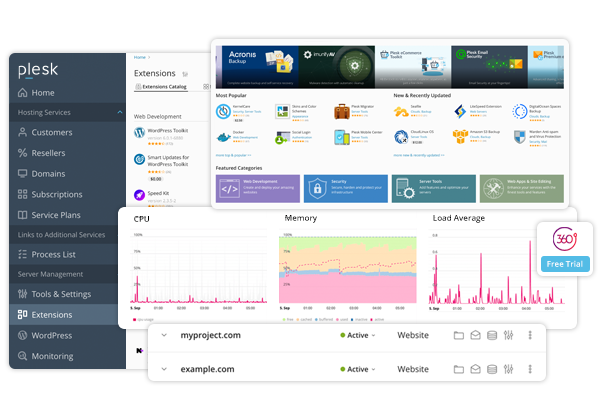
A defining characteristic of Plesk is its centralized dashboard that organizes server-related tasks into accessible sections. Through this interface, administrators can view system resources, manage domains, configure hosting plans, and control server services.
The dashboard typically provides access to:
- Domain and DNS management
- File system access
- Database administration
- Email configuration
- Server monitoring tools
This structure reduces the need to interact directly with server configuration files.
Multi-Domain and Multi-Site Management
Plesk is designed to manage multiple websites from a single interface. Each domain can have its own configuration settings, database connections, email accounts, and file directories.
This feature is particularly useful in environments where organizations host numerous client websites or operate multiple projects on a single server.
Administrators can allocate resources such as storage space, bandwidth, and database access on a per-domain basis.
Built-In Security Tools
Security management is an important aspect of server administration. Plesk includes several integrated security features that allow administrators to manage protective measures without relying solely on external tools.
Common security components include:
- Firewall configuration
- SSL certificate management
- Malware scanning tools
- Web application firewall integration
- Automatic security updates
These tools are intended to reduce common vulnerabilities associated with website hosting.
Website and Application Deployment
Plesk supports the deployment of websites and applications using automated installers and development tools. This often includes integration with common content management systems and development frameworks.
Users can deploy applications through the interface without manually configuring server environments.
In developer-focused setups, Plesk also supports integration with version control systems and container technologies.
Email Hosting Management
In addition to website hosting, Plesk provides tools for managing email services linked to domains. Administrators can create email accounts, configure forwarding rules, and manage spam filtering settings.
These email features are often integrated with the domain management system, allowing users to create professional email addresses associated with their websites.
Database Administration
Most websites rely on databases for storing content, user information, and application data. Plesk provides database management tools that allow users to create and manage databases directly from the control panel.
Users can typically work with databases such as:
- MySQL
- MariaDB
- PostgreSQL
- Microsoft SQL Server (in Windows environments)
Administrative tasks like user creation, permissions management, and backups can be performed within the interface.
Backup and Restoration Systems
Data protection is another area addressed by Plesk through built-in backup systems. These tools allow administrators to create backups of websites, databases, and configuration files.
Backups can be scheduled automatically or created manually, depending on the hosting configuration.
Restoration tools allow previously saved backups to be deployed if a website needs to be recovered.
Common Use Cases
Web Hosting Providers
Many web hosting companies use control panels to manage large numbers of customer accounts. Plesk allows providers to allocate hosting resources and create separate environments for each customer.
Hosting providers may also create customized hosting plans with specific limits and permissions.
Digital Agencies Managing Client Websites
Agencies that build and maintain websites for clients often need to manage multiple projects simultaneously. Plesk allows agencies to organize client websites within a structured interface while maintaining separation between domains.
This structure simplifies maintenance tasks such as updates, backups, and security monitoring.
Developers Managing Deployment Environments
Software developers sometimes use Plesk to manage staging and production environments. The interface provides tools for deploying code, managing databases, and configuring server settings.
Integration with development workflows can support version control and application deployment.
Small Business Website Administration
Organizations without dedicated system administrators may rely on control panels to simplify website management tasks. Plesk enables non-specialists to manage domains, email accounts, and basic website settings.
This reduces reliance on direct server administration.
Multi-Site Management for Organizations
Organizations operating multiple brands or services may host several websites on the same infrastructure. Plesk enables centralized management while allowing each site to maintain independent configurations.
Potential Advantages
Reduced Need for Command-Line Administration
One of the primary advantages of using a hosting control panel like Plesk is the ability to perform many server tasks without interacting directly with the operating system command line.
This can make server management more accessible to individuals who do not specialize in system administration.
Centralized Infrastructure Management
Managing websites, domains, databases, and email services through a single interface can improve operational organization. Instead of switching between different tools, administrators can monitor and configure services within one environment.
Cross-Platform Compatibility
Plesk supports both Windows and Linux server environments, which is not always the case with control panels. This compatibility can make it suitable for organizations operating mixed infrastructure.
Extensible Architecture
The platform supports extensions and add-ons that expand functionality. These extensions may include security tools, development integrations, and performance monitoring features.
Extensions allow administrators to adapt the system to different operational needs.
Scalable for Different Hosting Sizes
Plesk can be used on smaller servers hosting a few websites as well as on larger systems supporting many domains. This scalability allows it to operate in multiple hosting contexts.
Limitations & Considerations
Licensing Requirements
Unlike some open-source alternatives, Plesk typically operates under a commercial licensing model. The cost structure may vary depending on the number of domains, server type, or feature set.
Organizations considering control panel options may evaluate licensing structures as part of their decision-making process.
Resource Consumption
Control panels add an additional software layer to server infrastructure. Running Plesk requires system resources such as CPU, memory, and storage.
On lower-capacity servers, administrators may need to consider whether the overhead affects performance.
Learning Curve for Advanced Features
Although the interface simplifies many tasks, advanced configuration features still require technical knowledge. Administrators responsible for server security, performance tuning, or application configuration may need to understand the underlying systems.
Dependency on Control Panel Ecosystem
Using a control panel means relying on its structure for system configuration. If administrators later choose to move to direct server management, they may need to adjust workflows and configurations.
Who Should Consider Plesk
Web Hosting Companies
Organizations providing shared hosting services often require structured systems for managing customer accounts, domains, and resource allocations. Control panels like Plesk are commonly used in these environments.
Agencies Managing Multiple Client Projects
Agencies responsible for maintaining client websites may benefit from a centralized platform that organizes projects and administrative access.
Developers Managing Server Deployments
Developers working with multiple applications or environments sometimes use control panels to streamline configuration tasks while maintaining development workflows.
Businesses Without Dedicated System Administrators
Small organizations that need to manage websites and email services may prefer graphical interfaces rather than manual server administration.
Who May Want to Avoid It
Administrators Preferring Manual Server Management
System administrators who prefer full control through command-line interfaces may not require a control panel. Direct configuration can provide more flexibility in certain technical scenarios.
Minimalist Server Environments
Projects designed to run on lightweight infrastructure may prefer minimal software layers. Adding a control panel introduces additional processes and system components.
Highly Customized Infrastructure Deployments
Organizations operating complex or highly customized infrastructure may rely on automation frameworks and configuration management tools rather than graphical control panels.
Comparison With Similar Tools
The web hosting control panel market includes several platforms with overlapping capabilities. Plesk is often compared with alternatives such as cPanel, DirectAdmin, and Webmin.
cPanel
cPanel is another widely used hosting control panel, particularly in shared hosting environments. Historically, cPanel has been associated primarily with Linux servers.
Plesk differs in that it supports both Linux and Windows hosting environments. The interface structure and feature organization also differ between the two systems.
DirectAdmin
DirectAdmin is known for its relatively lightweight resource usage compared with some other control panels. It focuses on core hosting management functions.
Plesk typically includes a broader ecosystem of extensions and integrated development tools.
Webmin
Webmin operates as a system administration interface rather than a traditional hosting control panel. It offers a wide range of configuration modules but may require more technical familiarity.
Plesk is generally positioned as a more structured hosting management platform.
Final Educational Summary
Plesk represents a widely adopted approach to simplifying server and website management through a graphical interface. By integrating tools for domain management, email services, database administration, security configuration, and backups, the platform allows administrators to perform many tasks without directly interacting with server command lines.
The platform is used across multiple contexts, including web hosting providers, digital agencies, development teams, and organizations operating multiple websites. Its support for both Linux and Windows environments distinguishes it from some competing control panels.
However, the decision to use a hosting control panel depends on infrastructure needs, technical expertise, and operational preferences. While Plesk can simplify many administrative tasks, it also introduces an additional software layer that must be maintained and managed.
Understanding how hosting control panels function—and the role they play in web infrastructure—can help organizations evaluate which server management approach aligns with their technical requirements.
Disclosure: This article is for educational and informational purposes only. Some links on this website may be affiliate links, but this does not influence our editorial content or evaluations.