
Introduction
Digital communication channels have expanded rapidly over the past decade, reshaping how organizations interact with users across devices. Email, SMS, and social media have traditionally dominated this landscape, but increasing competition for attention has made it difficult for messages to reach audiences effectively. Issues such as inbox saturation, declining open rates, and ad fatigue have pushed businesses and publishers to explore alternative engagement tools.
Web push notifications have emerged as one such solution. These browser-based alerts allow websites to send short, real-time messages directly to users who have opted in, without requiring email addresses or app installations. This category of tools focuses on immediacy, visibility, and re-engagement, especially for users who may not return to a website frequently.
PushOwl, now associated with Brevo, is part of this broader ecosystem. It operates within the web push notification space, aiming to provide structured communication workflows that integrate with e-commerce and content platforms.
What Is PushOwl?
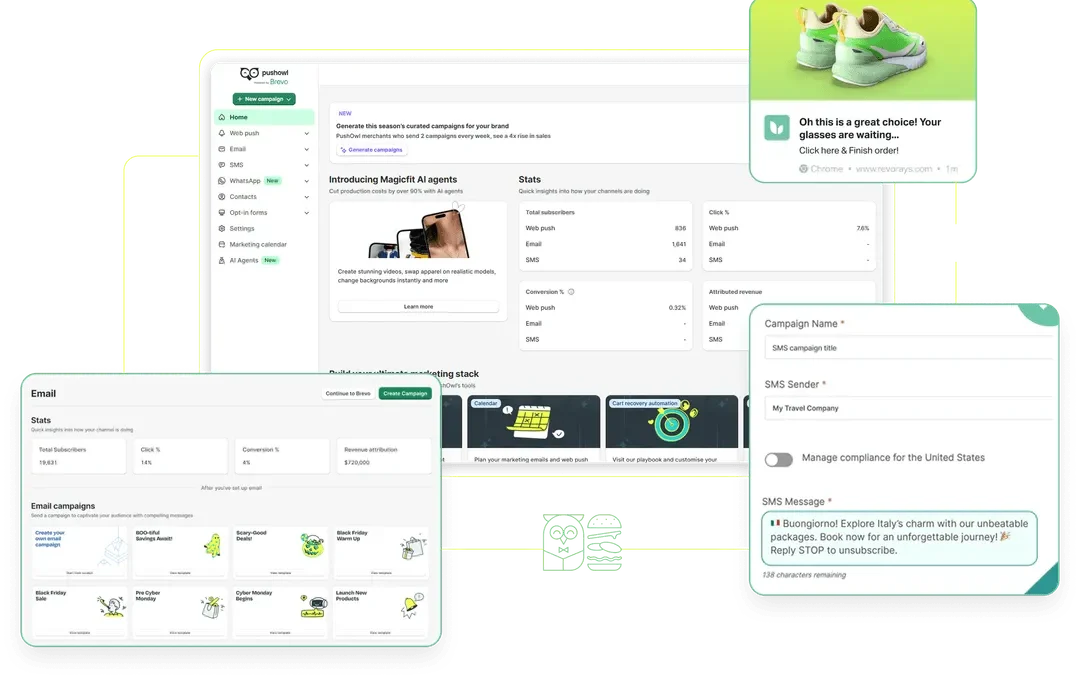
PushOwl is a web push notification platform designed to help websites send automated and manual notifications to users via desktop and mobile browsers. It falls under the category of customer engagement tools, specifically within the subset of browser-based messaging systems.
The platform is commonly used in conjunction with e-commerce systems, particularly Shopify, although its functionality extends to other types of websites. PushOwl enables site owners to collect subscriber permissions through browser prompts and then deliver notifications such as reminders, updates, or announcements.
Brevo’s involvement reflects a broader trend toward consolidation in the customer communication software space, where email, SMS, and push notifications are increasingly managed within unified platforms.
Key Features Explained
Subscriber Collection Mechanisms
PushOwl includes tools to capture user consent for notifications. These typically appear as browser prompts requesting permission to send updates. The system may allow customization of timing and display format, which can influence opt-in rates.
Unlike email subscriptions, this process does not require users to provide personal information such as names or addresses. Instead, it relies on browser-based identifiers.
Automated Notification Campaigns
Automation is a central feature. PushOwl supports triggered notifications based on user behavior. For example, when a visitor adds an item to a cart but leaves the site without completing a purchase, an automated message can be sent later.
Other automation flows may include:
- Welcome notifications after subscription
- Product availability alerts
- Price change updates
- Browsing reminders
These workflows are typically configured using rule-based logic rather than manual intervention.
Broadcast Messaging
In addition to automation, PushOwl allows for one-time broadcast messages. These can be used to inform subscribers about announcements, updates, or time-sensitive information.
Broadcasts are generally scheduled or sent immediately, depending on the use case. The content format is concise, often including a title, short message, and optional image or icon.
Audience Segmentation
Segmentation enables grouping users based on behavior, location, or interaction history. This allows for more targeted messaging rather than sending identical notifications to all subscribers.
Segmentation criteria may include:
- Pages visited
- Purchase history
- Device type
- Geographic region
This feature supports more context-aware communication.
Analytics and Reporting
PushOwl includes tracking tools that provide data on delivery rates, clicks, and conversions. These metrics are used to evaluate the effectiveness of campaigns and optimize messaging strategies.
Analytics may also include subscriber growth trends and performance comparisons across campaigns.
Integration Capabilities
The platform integrates with various systems, particularly e-commerce platforms. These integrations allow PushOwl to access product data, user behavior, and transaction events, which are necessary for automation workflows.
Integration with broader communication tools, such as those offered by Brevo, reflects an effort to centralize customer engagement channels.
Common Use Cases
E-commerce Cart Recovery
One of the most widely documented uses of push notifications is cart abandonment recovery. When users leave a site without completing a purchase, PushOwl can trigger reminders encouraging them to return.
This use case relies on behavioral tracking and timing strategies.
Product Updates and Alerts
Retailers often use PushOwl to notify users about restocked items or price changes. This is particularly relevant for high-demand or limited-availability products.
Such alerts are typically automated and tied to inventory systems.
Content Publishing Notifications
Media websites and blogs may use push notifications to alert subscribers when new content is published. This helps drive repeat visits without relying solely on email newsletters.
The immediacy of push notifications can be advantageous for time-sensitive content.
Promotional Announcements
Although not limited to commercial contexts, push notifications are frequently used to share promotional messages. These may include seasonal offers, discounts, or event announcements.
The short format requires concise messaging.
User Re-engagement
PushOwl can be used to re-engage users who have not visited a site for a period of time. Notifications may include reminders, updates, or personalized messages based on past activity.
Potential Advantages
Direct Communication Channel
Push notifications appear directly on user devices, often outside the browser window. This visibility can make them more noticeable than emails or ads.
The absence of intermediary platforms reduces dependency on algorithms that filter content.
No Requirement for Personal Data Entry
Unlike email marketing, push notifications do not require users to submit personal details. This can lower the barrier to entry and increase subscription rates.
However, it also limits the depth of user profiling.
Real-Time Delivery
Messages can be delivered instantly, making push notifications suitable for urgent or time-sensitive information. This is particularly useful for updates that require immediate attention.
Automation Capabilities
The ability to automate workflows based on user behavior allows for continuous engagement without manual effort. This can support scalability in communication strategies.
Cross-Device Reach
Push notifications can reach users on both desktop and mobile browsers, depending on compatibility and user settings.
Limitations & Considerations
Dependence on User Opt-In
Push notifications require explicit user permission. If users decline the initial prompt, re-engagement becomes difficult.
Opt-in rates can vary significantly based on timing, design, and user trust.
Browser and Device Restrictions
Not all browsers or devices support push notifications equally. For example, certain mobile operating systems have historically limited support for web push functionality.
This can affect reach and consistency.
Message Constraints
Push notifications are limited in length and format. This restricts the amount of information that can be conveyed in a single message.
Complex content may require alternative channels.
Risk of Overuse
Frequent or irrelevant notifications can lead to user fatigue. This may result in users disabling notifications or unsubscribing altogether.
Maintaining relevance and frequency balance is important.
Limited Personalization Compared to Email
While segmentation is available, the lack of detailed user data can limit personalization depth. Email platforms often provide more granular targeting options.
Who Should Consider PushOwl
PushOwl may be relevant for:
- E-commerce platforms seeking behavioral automation tools
- Content publishers aiming to increase return visits
- Websites with recurring user engagement needs
- Organizations exploring alternatives to email-based communication
It is particularly suited to environments where real-time updates and brief messaging are effective.
Who May Want to Avoid It
PushOwl may be less suitable for:
- Businesses requiring long-form communication
- Organizations with limited website traffic
- Contexts where users are unlikely to opt in to notifications
- Industries with strict privacy or compliance requirements
In such cases, other communication channels may offer more flexibility.
Comparison With Similar Tools
PushOwl vs OneSignal
OneSignal is another widely used push notification platform. It offers broader multi-channel support, including email and SMS, alongside push notifications.
PushOwl, by contrast, is often associated with e-commerce-specific workflows and Shopify integration. The choice between the two may depend on the desired level of integration and channel diversity.
PushOwl vs WebEngage
WebEngage provides a more comprehensive customer engagement suite, including analytics, email, and in-app messaging. It may be more suitable for enterprises requiring advanced segmentation and data analysis.
PushOwl focuses more narrowly on push notifications, which may simplify implementation but limit scope.
PushOwl vs Firebase Cloud Messaging
Firebase Cloud Messaging is a developer-oriented solution that requires more technical setup. It offers flexibility but lacks the user-friendly interface and pre-built workflows found in PushOwl.
PushOwl is generally more accessible for non-technical users.
Final Educational Summary
PushOwl represents a segment of the digital communication ecosystem that prioritizes immediacy and simplicity. As a web push notification platform, it enables websites to establish a direct channel to users who have opted in, bypassing traditional inbox-based systems.
Its functionality centers on automation, behavioral triggers, and concise messaging. These features make it particularly relevant for e-commerce environments and content-driven websites. However, its effectiveness depends on user consent, message relevance, and appropriate usage frequency.
While it offers certain advantages in visibility and real-time delivery, it also comes with limitations related to format constraints and platform compatibility. As with any communication tool, its role is best understood within a broader strategy that may include multiple channels.
Disclosure
Disclosure: This article is for educational and informational purposes only. Some links on this website may be affiliate links, but this does not influence our editorial content or evaluations.