
Introduction
Modern work environments increasingly rely on distributed teams, asynchronous communication, and complex project coordination. As organizations expand across locations and time zones, traditional collaboration methods—such as in-person meetings or static documents—often fall short. This shift has created demand for digital environments that can replicate, and in some cases enhance, interactive teamwork.
Visual collaboration tools have emerged to address this gap. These platforms allow users to brainstorm, plan, map processes, and share ideas in a dynamic, spatial format. Unlike linear text-based tools, visual workspaces provide flexibility for mapping relationships between ideas, facilitating both creative exploration and structured planning.
Within this category, Miro represents a widely recognized platform designed to support collaborative thinking and project visualization in digital settings.
What Is Miro?
Miro is a cloud-based visual collaboration platform that enables users to create and interact with digital whiteboards. It is classified under the broader category of online whiteboard software and collaborative workspace tools.
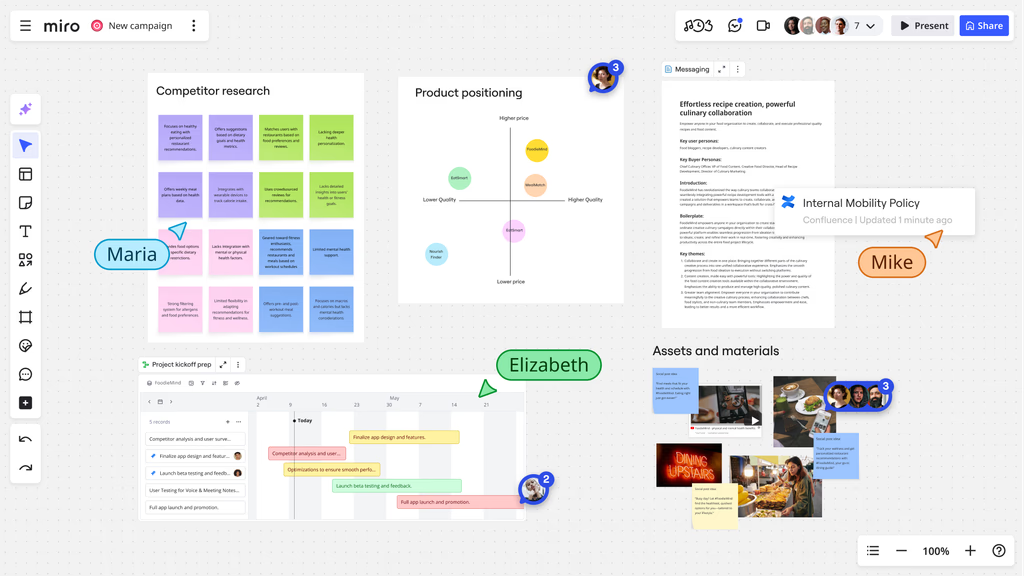
The platform provides a canvas where individuals and teams can place elements such as text, diagrams, images, sticky notes, and frameworks. These elements can be arranged freely, allowing users to simulate brainstorming sessions, workflows, or structured diagrams without physical constraints.
Miro is commonly used in professional, educational, and creative contexts. Its functionality supports real-time collaboration, meaning multiple users can work simultaneously on the same board. This capability positions it as a tool for both synchronous meetings and asynchronous project development.
Key Features Explained
Infinite Canvas Design
One of the defining characteristics of Miro is its infinite canvas. Unlike traditional document editors that restrict content to fixed pages, this feature allows users to expand their workspace as needed. Teams can zoom in and out, navigate across large boards, and organize multiple sections within a single environment.
This approach is particularly useful for complex projects that require multiple layers of information, such as product roadmaps or system architectures.
Real-Time Collaboration
Miro supports simultaneous editing by multiple users. Participants can view cursor movements, add content, and interact with elements in real time. This mirrors the experience of working together on a physical whiteboard, but with added digital flexibility.
Additional collaboration features include comments, mentions, and live reactions, which help streamline communication without relying solely on external messaging tools.
Pre-Built Templates
The platform includes a wide range of templates designed for different use cases. These templates cover areas such as brainstorming, agile workflows, mind mapping, and user journey mapping.
Templates can serve as structured starting points, reducing the time required to set up boards and ensuring consistency across projects.
Integration Capabilities
Miro integrates with various productivity and project management tools. These integrations allow users to connect their workflows across platforms, importing or exporting data as needed.
For example, teams can embed documents, link tasks, or synchronize updates between systems, creating a more unified digital workspace.
Diagramming and Visualization Tools
Miro includes built-in tools for creating diagrams such as flowcharts, wireframes, and organizational charts. Users can connect elements with arrows, define relationships, and customize visual layouts.
These capabilities make it suitable for both technical and non-technical users who need to represent processes visually.
Collaboration Controls and Permissions
The platform offers different permission levels, allowing administrators to control who can view, comment, or edit boards. This is particularly relevant in organizational settings where sensitive information may be involved.
Access control helps maintain structure and security within collaborative environments.
Common Use Cases
Brainstorming Sessions
Miro is frequently used for idea generation. Teams can create digital sticky notes, cluster concepts, and explore different directions without predefined constraints. This makes it suitable for creative workshops and innovation exercises.
Project Planning
Project managers use Miro to map timelines, define milestones, and organize tasks. Visual planning boards can provide a high-level overview while still allowing detailed breakdowns of individual components.
Agile and Scrum Workflows
The platform supports agile methodologies by offering templates for sprint planning, retrospectives, and backlog management. Teams can visualize workflows and track progress in a shared space.
User Experience (UX) Design
Design teams often use Miro for wireframing, user journey mapping, and interface planning. The visual format allows designers to communicate ideas clearly and gather feedback from stakeholders.
Educational Applications
Educators and students use Miro for collaborative learning, group projects, and interactive lessons. It can serve as a digital classroom whiteboard, supporting engagement and participation.
Remote Workshops and Meetings
Facilitators use Miro to conduct structured workshops online. Activities such as voting, grouping, and discussion can be managed within the platform, reducing reliance on multiple tools.
Potential Advantages
Flexibility in Visual Thinking
Miro’s open canvas supports non-linear thinking. Users can move freely between ideas, rearrange content, and experiment with different structures. This flexibility can enhance creativity and problem-solving.
Centralized Collaboration
By consolidating multiple collaboration activities into one platform, Miro reduces the need for switching between tools. Teams can brainstorm, plan, and document within a single environment.
Accessibility Across Devices
As a cloud-based platform, Miro can be accessed from various devices, including desktops, tablets, and smartphones. This accessibility supports remote and hybrid work models.
Support for Diverse Workflows
The platform accommodates different working styles, from structured planning to open-ended brainstorming. Its adaptability makes it applicable across industries and roles.
Visual Clarity
Complex ideas can often be easier to understand when presented visually. Miro enables users to break down information into diagrams and visual frameworks, improving comprehension.
Limitations & Considerations
Learning Curve for New Users
While the interface is designed to be user-friendly, new users may require time to become familiar with the platform’s features. The abundance of tools and options can initially feel overwhelming.
Performance on Large Boards
Extensive boards with a high volume of elements may affect performance, particularly on lower-powered devices. Navigation and loading times can vary depending on board complexity.
Dependence on Internet Connectivity
As an online tool, Miro requires a stable internet connection. Limited connectivity can impact usability, especially during real-time collaboration sessions.
Organizational Complexity
Without clear structure, boards can become cluttered. Large teams working simultaneously may create disorganized layouts if guidelines are not established.
Feature Limitations in Free Plans
Certain advanced features may be restricted depending on the subscription level. Users should evaluate which functionalities are essential for their needs.
Who Should Consider Miro
Miro is relevant for individuals and teams that rely on visual collaboration and interactive planning.
- Remote and distributed teams seeking shared workspaces
- Project managers handling complex workflows
- Designers working on user experience and interface concepts
- Educators facilitating collaborative learning
- Consultants conducting workshops or strategy sessions
Organizations that prioritize visual communication and collaborative problem-solving may find the platform aligns with their operational needs.
Who May Want to Avoid It
Not all users require a visual collaboration platform. In some cases, alternative tools may be more appropriate.
- Individuals working primarily with text-based documentation
- Teams with minimal need for collaborative brainstorming
- Users with limited internet access or low-performance devices
- Projects requiring highly structured, linear workflows without visual mapping
For such scenarios, simpler or more specialized tools may provide a better fit.
Comparison With Similar Tools
Miro operates within a competitive landscape of digital whiteboard and collaboration platforms. Understanding how it differs from similar tools can provide useful context.
Miro vs. Microsoft Whiteboard
Microsoft Whiteboard focuses on integration within the Microsoft ecosystem. While it offers basic collaboration features, Miro provides a broader range of templates and advanced visualization tools.
Miro vs. Mural
Mural is another visual collaboration platform with similar functionality. Differences often lie in interface design, template availability, and specific collaboration features. User preference may depend on workflow requirements.
Miro vs. Lucidchart
Lucidchart is more specialized in diagramming and technical visualization. While Miro includes diagramming capabilities, it also emphasizes open-ended collaboration and brainstorming.
Miro vs. FigJam
FigJam, developed for design collaboration, integrates closely with design workflows. Miro, by contrast, caters to a wider range of use cases beyond design-specific tasks.
Each platform serves overlapping but distinct purposes, and the choice often depends on the intended application.
Final Educational Summary
Miro represents a comprehensive approach to digital collaboration through visual workspaces. By combining an infinite canvas with real-time interaction, it addresses challenges associated with remote teamwork and complex project planning.
Its features support a wide range of activities, from brainstorming sessions to structured workflows. At the same time, considerations such as learning curve, performance, and organizational discipline play a role in determining its effectiveness.
As part of the broader category of visual collaboration tools, Miro illustrates how digital platforms are evolving to accommodate more interactive and flexible forms of work. Its relevance continues to grow alongside trends in remote work, distributed teams, and visual communication.
Disclosure: This article is for educational and informational purposes only. Some links on this website may be affiliate links, but this does not influence our editorial content or evaluations.